# 실제에서의 디자인(Design In Practice)
- Speaker: Rich Hickey
- Conference: Clojure Conj 2023 (opens new window) - April 2023
- Video: https://www.youtube.com/watch?v=fTtnx1AAJ-c&list=PLZdCLR02grLpIQQkyGLgIyt0eHE56aJqd (opens new window)
- Slides: https://download.clojure.org/presentations/DesignInPractice.pdf (opens new window)
[Google Bard 요약] Design in Practice는 Rich Hickey가 2013년에 발표한 컨퍼런스 연설의 텍스트입니다. 이 연설에서 Hickey는 설계의 중요성과 그것이 코드에 미치는 영향에 대해 이야기합니다. 그는 또한 설계 원칙과 패턴을 소개하고, 그것들이 어떻게 코드의 품질을 향상시키는지 보여줍니다.
Hickey는 설계는 코드의 품질을 향상시키는 데 필수적이라고 주장합니다. 설계는 코드가 이해하기 쉽고 유지 관리하기 쉽고 확장하기 쉽도록 합니다. 설계는 또한 코드가 예측 가능하고 일관되게 작동하도록 합니다.
Hickey는 설계 원칙은 코드의 품질을 향상시키는 데 도움이 된다고 주장합니다. 설계 원칙은 코드가 작성되는 방식을 지침합니다. 그들은 코드가 일관되게 작동하고 예측 가능하게 작동하도록 합니다.
Hickey는 패턴은 코드의 품질을 향상시키는 데 도움이 된다고 주장합니다. 패턴은 코드에서 발생하는 일반적인 문제를 해결하는 데 도움이 되는 재사용 가능한 코드 조각입니다. 패턴은 코드의 재사용성을 높이고 코드의 길이를 줄입니다.
Hickey는 설계는 코드의 품질을 향상시키는 데 필수적이라고 주장합니다. 설계 원칙과 패턴은 코드의 품질을 향상시키는 데 도움이 됩니다.
요약:
- 설계는 코드의 품질을 향상시키는 데 필수적입니다.
- 설계 원칙은 코드가 이해하기 쉽고 유지 관리하기 쉽고 확장하기 쉽도록 합니다.
- 패턴은 코드의 재사용성을 높이고 코드의 길이를 줄입니다.
[Time 0:00:00]
# Design in Practice
slide title: Design in Practice

Rich Hickey
모두 와주셔서 감사합니다. 오랜 친구들, 새로운 친구들, 특히 모두가 하고 있는 멋진 일들을 모두 볼 수 있어서 정말 좋았습니다. 제 강연보다 먼저 놀라운 그래픽으로 가득 차서 더 이상 견딜 수 없을 것 같아서 제 강연에서 빼도 될 만큼 멋진 그래픽으로 가득 찬 강연 일정을 잡아준 Alex에게 두 배로 감사하고 싶습니다.
Thanks everyone for coming. It is so great to see all the old friends, and all the new friends, and especially all the very cool things everyone is doing. I want to doubly thank Alex for scheduling a talk before mine that was so full of amazing graphics that no one would possibly be able to bear any more, and I could I could leave them out of my talk.
[Time 0:00:26]
# Objective - Demystify Design
slide title: Objective - Demystify Design

            not (just) going to the hammock
                 practice - 'what you do'

concrete techniques with tangible outputs
demonstrate _progress_ 'walk forward'
activities you can make PM stories out of

  thus make time for, throughout the dev process

  not pleading for 2 weeks of nebulous 'hammock time' up front

valuable artifacts that make the effort evident

tips and techniques, not a formal method or anything highfalutin
이번 강연은 '디자인 인 프랙티스'로, 디자인을 다소 이해하기 쉽게 설명하는 것이 목표입니다. 과거에 디자인에 대한 많은 아이디어에 대한 강연을 몇 차례 한 적이 있지만, 구체적인 실행에 대해서는 설명하지 않은 것 같습니다. 그러다 보니 디자인에 대한 마술 같은 상상을 불러일으키기도 했는데, 저는 이를 없애고 싶습니다. 디자인은 배울 수 있는 것이라고 생각합니다. 구체적인 활동이나 관행 또는 우리가 하는 일들이 있는 것이라고 생각합니다.
아참, 단어 정의 빙고 게임을 하고 계신다면 오늘 카드가 두 장 이상 있었으면 좋았을 거예요.
그리고 제가 생각하는 가벼운 일들, 즉 우리가 Clojure와 Datomic에서 팀으로 디자인 작업을 할 때 실제로 실제로 하는 일들에 대해 이야기해 보려고 합니다. 그래서 우리는 구체적인 것들에 대해 이야기하고 있습니다.
제가 하고 싶은 또 다른 일은 활동으로 만들 수 있는 것들에 대해 이야기하는 것입니다. 많은 사람들이 "우리 가게에서 더 많은 디자인을 하고 싶지만 정당화할 수 없습니다."라고 말할 때 어려움을 겪는다고 생각합니다. "2주 정도 쉬면서 문제에 대해 생각해보고 시작하고 싶어요."와 같은 모호한 말을 하기도 합니다. 그리고 설령 그렇게 한다고 해도 처음에 2주가 반드시 필요한 것은 아닙니다.
따라서 활동을 구체화하는 것의 좋은 점 중 하나는 프로젝트 관리 시스템으로 들어가서 결과물이 나올 수 있는 스토리가 될 수 있다는 것입니다.
오늘 제가 이야기하고 싶은 또 다른 것은 진행 상황입니다. 많은 사람들이 "나는 디자인이 뭔지 안다"고 말합니다. 플래닝 시트나 다이어그램 같은 것을 하는 사람들을 본 적이 있습니다. 하지만 저는 정말 감각이 없어요: 내가 다이어그램을 제대로 작성했는가? 내가 무언가를 성취하고 있는가?" 소프트웨어를 만들 때 우리는 소프트웨어가 점점 더 많은 일을 하는 것을 보게 됩니다. 그렇다면 우리가 설계할 때 앞으로 나아간다는 것은 무엇을 의미할까요? 우리가 앞으로 나아가고 있다는 것을 알고 있을까요, 아니면 그냥 빙빙 돌고 있을까요?
그래서 이것은 어떤 종류의 방법도 아닙니다. 저는 그런 방식을 채택하고 싶지 않습니다. 적절한 방법에 비를 내리려는 것이 아닙니다. 세상에는 정말 멋진 디자인 방법론이 많이 있습니다.
So this is Design In Practice, and the objective here is to demystify design somewhat. I think I have given a few talks in the past that were about a lot of the ideas in design, but left the concrete practice of it sort of underspecified. And it has led to maybe a certain imagined magicness to design that I want to dispel. I think design is something that you can learn to do. I think it is something that has concrete activities, practices, or things that we do.
Oh, by the way, if you are playing word definition Bingo, you are going to wish you had more than one card today.
And to try to talk you through some of what I think are kind of lightweight things that we do, actually really do, in trying to do design as a team on Clojure and Datomic as we work. So we are talking about concrete things.
Another thing I want to do is talk about things that you can make into activities. I think a lot of people struggle when they say, "well, we want to do more design in our shop, but we can never get it justified." We are saying nebulous things like, "I want to take two weeks off and think about the problem before we start." And even if you get that, two weeks at the beginning is not necessarily what you are going to need.
So one of the things that is good about reifying activities is that they can become things that go into your project management system as stories that you are going to do that will have outputs.
The other thing I want to talk about today is progress. A lot of times people say, "I know what design is. I have seen people doing planning sheets, or diagrams, or things like that. But I do not really have a sense of: Did I write the right diagram? Am I accomplishing something?" When we make software, we see it accrete, and we see it do more and more stuff every day. And when we design, what does it mean to move forward? Do we know we are moving forward, or just spinning around?
So this is not any kind of method. I do not want to adopt that. I am not trying to rain on proper methods. And there are there are plenty of really cool design methodologies out there.
[Time 0:02:39]
# design - Latin for 'waiting to code'
slide title: Design

              design - Latin for 'waiting to code'

_coding happens throughout_

performing experiments

answering interim questions

why you want a language that supports exploratory programming
without being in a project building context
라틴어로 '디자인'이라는 뜻은 '코딩이 허용되지 않는다'는 뜻이라는 것을 우리 모두 알고 계실 겁니다.
[청중 웃음]
저는 사실 그렇지 않다고 생각합니다. 사실, 강연을 진행하면서 알게 되겠지만 디자인 프로세스 전반에 걸쳐 코딩을 수행한다고 생각합니다. 반드시 시스템을 작성하기 시작하는 것이 아니라 시스템이 어떻게 될지 탐색하고, 시스템의 일부가 될 요소에 대해 배우고, 질문에 답하고, 그런 식으로요. 이런 종류의 작업에 프로젝트와 같은 오버헤드가 전혀 없는 언어로 작업하는 것이 중요하다고 생각하는 이유 중 하나이기도 합니다. 탐색적 프로그래밍을 시작하기 위해 프로젝트를 시작하거나 프로젝트 컨텍스트에 있을 필요가 없다는 것이죠. 에디터를 열고 시작하면 됩니다.
So we all know, I am just reminding you, Latin for "design" means "not being allowed to code".
[Audience laughter]
I do not actually think that is true. In fact, I think that as we will see as we go through the talk that you do coding throughout the design process. Not necessarily starting to write your system, but exploring what your system might become, learning about the things that are going to be parts of your system, answering questions, and things like that. And it is one of the reasons why I think it is important to work in a language where that kind of work has zero project-y kind of overhead. That you do not need to have started your thing, or be in a project context to start doing exploratory programming. You open up your editor and you go.
[Time 0:03:28]
slide title: Design (cont.)

                'mark out, a plan'

the emphasis in this talk is about supporting your (team's) reasoning _process_,
      not just the end-product blueprint-like design

_writing down_ your thoughts helps you form them

       _techniques can guide your thinking and decision-making_

  reified/refined/shared concepts

  onboarding/resumption

  validation

  eventually, documentation
No. So really "design", the word means to "mark out a plan for doing something", or at least the meaning that we are going to use in this talk. I am going to expand that idea to be the entire set of steps that get you from a sense that something should happen in the world, to the ability to mark out that plan, the marking out of the plan, and then hopefully the subsequent development of it.
And this marking out is something I think is going to be super critical. We are going to be writing all the time. We are going to be putting text in front of our faces and in front of the faces of our teammates so we can see what we are thinking about. And I think this is something that is very important for helping you think in the first place.
This is not an archival activity. This is not about capturing things for posterity. It is not about creating documentation as you go or anything like that.
This is about writing as part of thinking. Putting something down on paper makes it a thing. It is something that you can then look at and now it becomes an input to you, even though it started in your own head. It also helps you pick things up when you have left them around for a while, or allows people to join you in your work. And then maybe eventually you will turn it into something that you will use to document what happened in the end.
그러니까 "디자인"이라는 단어는 "무언가를 하기 위한 계획을 표시하는 것"을 의미하거나 적어도 이 강연에서 사용할 의미입니다. 저는 이 개념을 세상에 어떤 일이 일어나야 한다는 감각에서 그 계획을 표시하는 능력, 그 계획을 표시하는 능력, 그리고 그 계획의 후속 개발로 이어지는 일련의 모든 단계로 확장하려고 합니다.
그리고 이 마크 아웃은 매우 중요하다고 생각합니다. 우리는 항상 글을 쓰게 될 것입니다. 우리는 우리가 무슨 생각을 하고 있는지 알 수 있도록 우리 얼굴과 팀원들의 얼굴 앞에 텍스트를 적을 것입니다. 그리고 이것은 처음에 생각하는 데 도움이 되는 매우 중요한 일이라고 생각합니다.
이것은 아카이브 활동이 아닙니다. 이것은 후손을 위해 무언가를 캡처하는 것이 아닙니다. 문서화 작업은 문서화 작업을 하는 것이 아닙니다.
이것은 사고의 일부로서 글을 쓰는 것입니다. 무언가를 종이에 적는 것은 그것을 하나의 사물로 만듭니다. 머릿속에서 시작된 것이지만 이제 그것을 볼 수 있고, 그것이 나에게 입력이 되는 것입니다. 또한 한동안 잊고 지냈던 아이디어를 다시 떠올리거나 다른 사람들이 작업에 동참할 수 있도록 도와줍니다. 그러다 보면 결국에는 어떤 일이 있었는지 기록하는 데 사용할 수 있는 자료로 전환할 수도 있습니다.
# Words
[Time 0:04:48]
slide title: Words

           Choose good words, _all the time_
     not about bikeshedding or premature marketing

precision in naming == precision in thinking 'before + cut'

          _eschew nicknames, superheroes etc._
               not semantic/meaningful
               give cover to fuzziness
            don't track evolving thinking

_be succinct_ 'gird/gather up'
brief, clear and complete
not just concise 'cut off', or merely hinted at
그래서 우리는 글을 쓸 것입니다. 우리는 말을 할 것이지만 특히 단어를 적을 것이고, 희망적으로는 다이어그램도 적을 수 있습니다. 그리고 좋은 단어를 선택하는 것이 매우 중요하다고 생각합니다. 항상 해야 하는 일입니다. 그리고 저는 제품이나 그와 비슷한 것에 적합한 이름을 고르거나 마케팅에 관한 일을 하는 것에 대해 말하는 것이 아닙니다.
여러분이 의도한 의미를 담고 있고 모든 사람이 여러분이 말하는 의미를 공유할 수 있는 단어를 선택하는 것입니다. 정확성과 절단에 대한 이 아이디어는 항상 등장할 것입니다. 이 "시스" 부분은 절단에 관한 것입니다. "결정하다"와 같은 부분입니다.
그래서 우리는 말을 할 때 정확해야만 우리가 말하는 것이 무엇인지, 그리고 우리가 말하는 것이 아닌 것이 무엇인지 알 수 있습니다.
그래서 저는 별명을 좋아하지 않습니다. 슈퍼히어로 같은 것도 싫고요. 가장 끔찍했던 일 중 하나는 프로젝트에 도착해서 상자 안의 별명, 상자 안의 별명, 상자 안의 별명, 레이블이 없는 화살표가 서로를 가리키는 프로젝트 다이어그램을 발견한 것이었습니다. 다른 사람을 돕는 것도 아니고 스스로를 돕는 것도 아닙니다. 이러한 이름은 의미가 없습니다.
특히 의미 있는 이름이 아니라는 것은 마음이 바뀌어도 바꿀 필요가 없다는 것을 의미합니다. 제가 "크립토나이트" 또는 "플래시"라고 불렀고, 제가하는 일을 바꾸더라도 여전히 "플래시"라고 불릴 수 있습니다. 괜찮을 거예요. 그래서 정확한 단어를 사용하고 싶군요.
그리고 자주 할 수 있어야 할 또 다른 일은 여백이 많지 않은 공간에서 무언가를 말할 수 있어야 한다는 것입니다. 이것도 또 다른 중요한 기술이라고 생각합니다. 이 강연에서 제가 "간결하다"고 반복해서 말하는 것을 보게 될 텐데, 그 의미를 이해하는 것이 중요합니다. 저는 어원적 관점에서 이 말이 무슨 뜻인지 잘 몰라서 찾아봤습니다. 전투 전에 토가를 모은다는 뜻입니다. 띠를 두르거나 모으다.
그리고 중요한 것은 간결하게 말하려고 할 때 모으는 것이 모든 것의 전부라는 것입니다. 간결한 것이 중요한 것이 아닙니다. 존재에 관한 것이 아닙니다: 여기서 할 말이 여섯 단어밖에 없으니 여섯 단어로 끝내야 하므로 중요한 세부 사항은 빼야 한다. 그래서 우리는 우리의 생각을 모을 것입니다.
So we are going to be writing. We are going to be talking, but especially writing words down, hopefully, and we can write diagrams down, too. And I think that choosing good words is super critical. It is something you should do all the time. And I am not talking about picking the right name for your product or anything like that, or doing something that is about marketing.
It is about choosing words that have the meaning that you intend and that help everybody come to a shared understanding of what you mean when you say something. This idea of precision and cutting is going to come up all the time. That "cis" part is about cutting. It is the same part of "decide".
So we we need to be precise when we are saying things so we know what is the thing we are saying, and what is not the thing we are saying.
So I do not like nicknames. No superheroes or anything like that. One of the most horrifying things was arriving at a project and finding a diagram of the project that was: nickname in a box, nickname in a box, nickname in a box, with unlabeled arrows pointing from one to the other. You are not helping anyone else, and you are not helping yourself. These names are not semantic.
And in particular by not being a meaningful name, it means that it does not have to change when you change your mind. I called it "Kryptonite" or something, "The Flash", and if I change what I am doing it could still be called "The Flash". It will be fine. So you want to use precise words.
And the other thing you are going to need to be able to do often is say something rather involved in not much space. And I think that is another critical skill. You are going to see me say "succinct" over and over and over again in this talk, and it is important to sort of understand what that means. Which I did not know what it meant you know from an etymology standpoint, so I looked it up. It means to gather up your toga before battle. To gird or gather up.
And the important thing is that what you are gathering up when you are trying to be succinct is the entirety of things. It is not about being concise. It is not about being: I have only got six words to say here, so I have got to leave out the critical details because I need to get it done in six words. So we are going to gather up our thoughts.
[Time 0:07:08]
# More Words
slide title: More Words

      _use the dictionary_ (not just good for writing keynotes)
                      _go right to the origins_
                  - most useful/abstract semantics
              - discover the composition within words

a good word later becoming 'wrong' could mean:

  you've changed your mind w/o acknowledging it

  you are drifting from your intentions

    _your thinking will evolve and your words (story titles etc) should also_
The other thing is this dictionary thing. It is not just good for writing talks. It is good every day. We do actually use the dictionary while we work. We get to a point where we need to name something and we will take out the dictionary. Everybody is racing through the thesaurus and trying to find the right word. And a good word -- I cannot state how wonderful I think that is and I encourage everybody to go do it.
And especially to get down to the origins where they break apart, because origins will always show you that most of the words that we use are composite and that prepositional prefix part is full of really interesting things. Like: Is it towards something? Is it away from something? Is it moving stuff together? Is it cutting it apart?
I think that doing this fires up the process of abstraction. You start thinking about things in a way that is not tied to the details, but more about bigger ideas.
The other advantage of using precise words is that you could be looking at this word and trying to communicate something, and it becomes evident that that word is the wrong word. It might have been a good word. And it might be that, in a perfectly fine way, you have changed your mind. You have evolved your thinking. You have got some new information and you are doing something different. But the great thing is if you have been using precise words, they will seem wrong and you can pause and pick a better word.
다른 하나는 사전입니다. 회담을 쓸 때만 좋은 것이 아닙니다. 매일매일 좋습니다. 실제로 일하면서 사전을 사용하죠. 이름을 지어야 할 지점에 도달하면 사전을 꺼냅니다. 모두가 시소러스를 뒤적이며 올바른 단어를 찾으려고 노력합니다. 그리고 좋은 단어가 나오면 얼마나 멋진지 말로 표현할 수 없을 정도이며, 모두가 그렇게 하도록 권장합니다.
특히 어원을 살펴보면 우리가 사용하는 대부분의 단어가 합성어이며 전치사 접두사 부분은 정말 흥미로운 것들로 가득 차 있다는 것을 알 수 있기 때문입니다. 예를 들어 무언가를 향하고 있나요? 무언가로부터 멀어지는가? 물건을 함께 움직이나요? 분리하는 건가요?
이렇게 하면 추상화 과정에 불이 붙는다고 생각합니다. 세부적인 것에 얽매이지 않고 더 큰 아이디어에 대해 생각하기 시작하죠.
정확한 단어 사용의 또 다른 장점은 이 단어를 보고 무언가를 전달하려고 할 때 그 단어가 잘못된 단어라는 것이 분명해진다는 것입니다. 좋은 단어였을 수도 있습니다. 그리고 완벽하게 괜찮은 방식으로 마음이 바뀌었을 수도 있습니다. 생각이 발전한 것입니다. 새로운 정보를 얻었고 뭔가 다른 일을 하고 있을 수도 있습니다. 하지만 좋은 점은 정확한 단어를 사용했다면 그 단어가 틀린 것처럼 보일 것이고 잠시 멈추고 더 나은 단어를 선택할 수 있다는 것입니다.
[Time 0:08:38]
# Technique: Glossary
slide title: Technique: Glossary

        _terms are inevitable in tech_
             valuable shorthand

don't presume a shared understanding

  define, in one place

  use uniformly and consistently

helps non-tech folks trying to follow along

_when terms break, fix or abandon_
좋아요. 이제 첫 번째 기법을 사용하겠습니다. 첫 번째 기법은 작업하는 동안 구축하는 자료 세트에 용어집을 추가하는 것입니다. 우리는 모든 종류의 용어와 기술을 갖게 될 것입니다. 기술자들 사이에서도 놀랍게도 우리가 한 단어를 말하면 방에 있는 모든 사람이 그것을 듣고 반복해서 사용했음에도 불구하고 머릿속에 다른 아이디어를 갖게 될 것입니다. 따라서 모든 사람이 여러분의 말을 이해한다고 가정하지 마세요.
한 곳에서 사물을 정의하고, 한 곳에서 사물을 정의한 다음, 정의한 후에는 일관되게 사용해야 합니다. 단어를 두 가지 다른 의미로 사용하지 마세요. 그것에 대해 느슨해지지 마세요.
이것은 일반적으로 어렵다고 생각하기 때문에 목표입니다. 누구도 완벽하게 해내지 못합니다. 이것은 열망해야 할 일입니다.
그리고 다른 하나는 무언가가 고장 나면 고치거나 떨어뜨리는 것입니다. 따라서 이러한 인공물 중 일부와 이러한 기술 중 일부는 일시적인 것입니다. 당신은 그것들을 할 것이고 당신은 계속 나아갈 것입니다. 하지만 이것은 여러분이 유지해야 하는 것입니다.
All right. So we are going to have our first technique. The first technique is: add a glossary to your set of stuff that you are building while you are working. We are going to have all kinds of terms and technology that is going to happen. It is amazing even amongst technologists, we will say a word, and everybody in the room will have a different idea in their head, even though they have heard it and used it over and over and over again. So do not presume that everybody understands what you are saying.
You want a place where you define things, one place where you define things, and then after you have defined it you want to use it consistently. Do not use words to mean two different things. Do not be lax about that.
This is hard to do, I think, in general, so it is an objective. No one does it perfectly. This is stuff to aspire to.
And then the other thing is if something breaks, fix it or drop it. So some of these artifacts and some of these techniques are things that are ephemeral. You are going to do them and and you are going to move on. But this is one that you have to maintain.
[Time 0:09:39]
# Example: Glossary
slide title: Example: Glossary

Term         Meaning

locality     A property of data: It is a measure of the distribution
             of datoms you need to find, across segments as seen from
             the perspective of one of the indexes.

affinity     A strategy for assigning partitions, where you say that
             things are related and should be in the same partition,
             and thus grouped together in storage

             (could be coaligned with another entity, with time, with
             a value, with a batch)

partition    See https://docs.datomic.com/on-prem/schema/schema.html#partitions
             Partitions group data together (in storage), providing
             locality of reference when executing queries across a
             collection of entities.
             Entities in the same partition to sort and be stored
             together in E-leading indexes, i.e. EAVT and AEVT.
             Partitions are associated with entity ids, and are named
             by keywords, or referred to by index in a space.
             Encoded as hi bits in entity ids.
             Partition entity ids are suitable as arguments to
             d/terpid, d/entid-at, and :db/force-partition

explicit partition
             partition associated with an explicitly-created, named
             partition entity
              datomic comes with 3 explicit partitions: :db.part/db
             :db.part/user and :db.part/tx

implicit partition
             a partition that can be referred to by its index in a
             range of integers 0<=x<524288.  These partitions have
             entity ids, and they require no explicit installation.
             Their entity ids consist of: part=index with the 20th bit
             set, eidx=0

             In larger applications, you may want to spread data
             across a larger number of partitions.  Implicit
             partitions provide a mechanism for this.
             Implicit partitions provides a way to manage a large
             number of partitions numerically and algorithmically.

             old ref to partition sharding

primary      the owning side of affinity, use to choose partition for
             related (e.g. the customer)

related      the "owned" side of affinity, gets partition from primary
             (e.g. some activity entities related to a particular
             customer)
So this is an example glossary. You probably cannot see that. I think I worked on how I can make you be able to see a little more. But this is a real one talking about a feature. We have a bunch of very specific words that we are using to talk about locality, affinity, and partitions in Datomic. And so this is a thing that we have, and that we maintained through a project that lasted eight months or so. So I encourage you to do this.
이것은 용어집의 예시입니다. 아마 보이지 않으실 겁니다. 조금 더 많이 볼 수 있도록 노력한 것 같습니다. 하지만 이것은 기능에 대해 이야기하는 실제 용어집입니다. 데이터믹에서 로컬리티, 선호도, 파티션에 대해 이야기할 때 사용하는 매우 구체적인 단어들이 많이 있습니다. 그래서 이것은 우리가 가지고 있고 8개월 정도 지속된 프로젝트를 통해 유지한 것입니다. 그래서 저는 여러분께 이 작업을 권장합니다.
[Time 0:10:09]
# Questions
slide title: Questions

          _a most powerful thinking tool_

to formulate a question is to reify what you seek

getting questions right is half the battle

_questions provoke_, often novel thinking

  logic (just) helps us rule out some of it
좋아요. 따라서 중요한 기술 감각의 일부로 우리가 할 또 다른 일은 질문하기입니다.
질문은 매우 강력한 도구입니다. 그리고 이것은 오래된 도구입니다. 질문을 하고 질문을 공식화하는 것의 아름다운 점 중 하나는 자신이 무언가를 찾고 있다는 것을 명확히 했다는 것입니다. 원하는 것이 있다는 것을 명확히 하는 것입니다.
그리고 우리는 항상 무언가를 말한다고 생각합니다. 그리고 말을 할 때는 의도가 분명하지 않습니다. 질문을 하면 답을 얻으려고 할 뿐만 아니라 필요한 것이 무엇인지 분명해집니다.
그래서 저는 좋은 질문을 하는 것이 기술이라고 생각합니다. 더 자주 하면 더 잘할 수 있는 것 중 하나이기도 합니다. 질문의 또 다른 측면은 질문이 도발적이라는 점입니다. 그들은 당신을 찌릅니다. 물론 다른 사람에게 질문을 할 때 상대방은 자신이 찔린 것처럼 느낍니다. 따라서 질문하는 것과 질문받는 것, 그리고 무언가를 질문하는 과정에 익숙해져야 합니다. 이는 긍정적인 일입니다.
논리는 의사결정을 내리고 문제를 해결하는 데 중요한 부분이지만 대부분 부정적인 측면이 있습니다. 우리는 논리를 사용하여 '안 돼, 이건 안 돼'라고 말하죠. 이것은 일관성이 없습니다. 만약 이것이 사실이라면 그것은 사실일 수 없습니다. 논리는 대부분 우리가 무언가를 배제하기 위해 사용하는 방식입니다.
All right. So the other thing we are going to be doing as part of an overarching sense of skills is asking questions.
This is a very powerful tool: asking questions. And it is an old tool. And one of the beautiful things about asking a question, and formulating a question, is: you have made clear that you are looking for something. That there is a thing that you want.
And I think that we state things all the time. And when you state things, your intentions are not evident. When you ask things, not only do you want to try to get an answer, but what you need becomes evident.
So I think asking good questions is a skill. It is another one of these things that if you do it more often you will get better at it. The other thing I think is an aspect of questions is that they are provocative. They poke you. And of course when you ask a question of someone else, they feel like they have been poked. So you have to get good at asking, and being asked, and being comfortable with the questioning process of something. That is a positive thing.
Logic is an important part of making decisions and solving problems, but it is mostly a negative thing. I mean, we use logic to say: no, this does not hold. This is inconsistent. If this is true, that cannot be true. It is mostly a way we use to rule things out.
[Time 0:11:36]
# Technique: The Socratic Method
slide title: Technique: The Socratic Method

              _interrogate 'ask together'_
            examine an idea dispassionately
   questioning its underlying assumptions, consistency

Dispassionate 'without suffering'

  you are not your idea

  you are a source of ideas, some better than others

_We don't define/opine the truth, we discover it_

'The Socratic Method: A Practitioner's Handbook' - Farnsworth
So another technique I recommend is to discover, read about, and utilize the Socratic method. This is a proper thing with a lot of history behind it, obviously, and some good organized descriptions.
It is an activity you do together. It is not like a leader torturing people with questions, although my teammates will disagree with that statement. But it means to sort of work together on trying to find the truth by asking and answering questions. By taking an answer to a question and exposing that answer to further examination, eventually trying to get to the truth.
And I talked before about questions being provocative. It is supposed to be a dispassionate examination of ideas. And that means not suffering. And I think that it is a big challenge as you try to do Socratic method with teams, this is not common, and I think socially this kind of dialogue has fallen away, and its use as a skilled practice amongst people who are cooperating has fallen away. So it just seems like a form of argument or attack or hostility or something like that. That is not what it is.
So one of the things I recommend is you try to detach yourself from your own ideas. Even when you do this by yourself, you should be thinking about your ideas as things you are going to pose and shoot down. And do that over and over and over again and not get attached to your ideas, not co-identify with your ideas. And the whole idea here is that there is some objective truth and we are trying to find out what it is. We are not inventing it. It is not coming out of our heads. We are discovering it.
If you want to learn more about the Socratic method I recommend this book. It is really fantastic. There is a bunch of history maybe at the beginning you would skip, but I think it is great.
그래서 제가 추천하는 또 다른 기법은 소크라테스 방법을 발견하고, 읽고, 활용하는 것입니다. 이것은 분명히 그 뒤에 많은 역사가 있고 잘 정리된 설명이 있는 적절한 것입니다.
함께 하는 활동입니다. 팀원들은 이 말에 동의하지 않겠지만 리더가 질문으로 사람들을 고문하는 것과는 다릅니다. 하지만 질문과 대답을 통해 진실을 찾기 위해 함께 노력하는 것을 의미합니다. 질문에 대한 답을 얻고 그 답을 추가 조사에 노출시킴으로써 결국 진실에 도달하려고 노력하는 것입니다.
앞서 질문이 도발적일 수 있다고 말씀드렸습니다. 질문은 아이디어에 대한 냉정한 검증이어야 합니다. 그리고 그것은 고통스럽지 않다는 것을 의미합니다. 그리고 팀과 함께 소크라테스 방식을 시도하는 것은 큰 도전이라고 생각합니다. 이것은 일반적이지 않으며 사회적으로 이런 종류의 대화가 사라지고 협력하는 사람들 사이에서 숙련 된 관행으로 사용되는 것이 사라 졌다고 생각합니다. 그래서 논쟁이나 공격 또는 적대감의 한 형태처럼 보이기도 합니다. 그런 것이 아닙니다.
그래서 제가 추천하는 것 중 하나는 자신의 생각에서 벗어나려고 노력하는 것입니다. 혼자서 이 작업을 할 때에도 자신의 아이디어를 포즈를 취하고 격추할 것으로 생각해야 합니다. 그리고 그것을 반복해서 반복하고 아이디어에 집착하지 말고 아이디어와 동일시하지 마세요. 여기서 중요한 것은 객관적인 진실이 있고 우리는 그것이 무엇인지 알아내려고 노력한다는 것입니다. 우리는 그것을 발명하지 않습니다. 우리 머릿속에서 떠오르는 것이 아닙니다. 우리는 그것을 발견하고 있습니다.
소크라테스 방식에 대해 더 자세히 알고 싶으시다면 이 책을 추천합니다. 정말 환상적입니다. 처음에는 건너뛸 수도 있는 많은 역사가 있지만 훌륭하다고 생각합니다.
[Time 0:13:33]
# Father Watson's Questions
slide title: Father Watson's Questions

Where are you at?

Where are you going?

What do you know?

What do you need to know?


Devs are good at the first two, but those miss 'why?'
So some of the the biggest Socratic wizards in the universe are the Jesuits. And I was lucky enough to study with the Jesuits back in high school. And my homeroom teacher was father Watson, a Jesuit. And he would always be asking us these four questions. And he would ask us these questions in physics class and in algebra class as a way to do the work, do the problem.
This stuff makes sense when you are looking at a problem. What have you got? I have got X, and I know Y, and I am trying to find X and the stuff's over here.
Where are you going? I am going to try to discover what X is. I know X. I need to know Y. What are you going to do? I am going to try to isolate Y by moving stuff over to the other side. And that was all fine.
But he also asked us these questions in homeroom as life questions Where are you at? Where are you going? What do you know? What do you need to know? And I think that as developers this "Where you are at?" "Where you are going?" This is what we do we are good at. This is stand up. What did you make yesterday? I made a bread box. What are you making today? I am making a toaster.
And then checking stuff off. And you are busy doing things, but you are not often talking about why you are doing the things. And the important part of these latter two questions is that you are now talking about why you are doing things from the perspective of moving your knowledge forward.
그래서 우주에서 가장 위대한 소크라테스 마법사 중 일부는 예수회입니다. 저는 운이 좋게도 고등학교 때 예수회와 함께 공부할 수 있었습니다. 제 담임 선생님은 예수회 신부 왓슨 신부님이셨죠. 신부님은 항상 우리에게 이 네 가지 질문을 하셨어요. 그리고 물리학 수업과 대수학 수업에서 문제를 풀기 위한 방법으로 이런 질문을 하곤 하셨죠.
이런 질문은 문제를 볼 때 의미가 있습니다. 뭘 찾았어? X는 알고 있고, Y는 알고 있고, X를 찾으려고 하는데 여기 물건이 있어요.
어디로 가려고요? X가 뭔지 알아내려고요. X는 알지만 Y는 알아야 해 어떻게 할 건데? 물건을 반대편으로 옮겨서 Y를 분리하려고 합니다. 그리고 그것은 모두 괜찮았습니다.
그러나 그는 또한 교실에서 다음과 같은 질문을 생활 질문으로 우리에게 물었습니다. 어디 있니? 어디로 가니? 무엇을 알고 있니? 무엇을 알아야 하나요? 그리고 저는 개발자로서 이 "지금 어디에 있니?" "어디로 가는가?" 이것이 우리가 잘하는 일입니다. 이것이 바로 스탠드업입니다. 어제 뭘 만들었나요? 빵 상자를 만들었습니다. 오늘은 뭘 만들 건가요? 토스터기 만들고 있어요.
그리고 물건을 확인합니다. 그리고 당신은 일을 하느라 바쁘지만 왜 그 일을 하는지에 대해서는 자주 이야기하지 않습니다. 이 후자의 두 가지 질문에서 중요한 부분은 지식을 발전시키는 관점에서 왜 일을 하는지에 대해 이야기하고 있다는 것입니다.
[Time 0:14:59]
slide title: Technique: Reflective Inquiry

                            Understanding            Activity
----------------------------------------------------------------------
Status 'to stand'       What do you know?          Where are you at?
----------------------------------------------------------------------
Agenda 'to be done'     What do you need to know?  Where are you going?


this is a framework that can be applied throughout the design process

       _note the importance of thinking about your thinking_
                         reflect - 'bend back'

  inquiry - advancing knowledge, is the driver
따라서 이 네 가지 질문을 두 가지 축과 두 단계로 나누어 살펴보겠습니다. 하나는 이해의 축입니다. 우리의 이해에는 어떤 변화가 일어나고 있나요? 우리의 이해는 어떻게 발전하고 있나요? 우리는 이 정도까지 이해했습니다. 이제 우리는 좀 더 이해할 것입니다. 개발할 때는 더 많은 코드를 작성하고 더 많은 기능을 추가하고 소프트웨어가 더 많은 일을 할 수 있기 때문에 진전이 있다는 것을 알 수 있다고 말씀드렸습니다.
디자인할 때 우리는 무엇을 만들고 있을까요? 디자인에 대해 생각할 수 있는 한 가지 방법은 이해를 창출하는 것이라고 말씀드리고 싶습니다. 이해를 확장하는 것입니다. 활동의 원동력은 이해의 확장이 되어야 합니다.
두 가지 질문을 각각 가져와서 하나는 상태 질문이라고 말할 것입니다. 그렇죠? 우리는 지금 무엇을 알고 있나요? 두 축 모두에 대해 우리가 손에 쥐고 있는 것은 무엇인가요?
그리고 다른 하나는 다음에 무엇을 하고 싶습니까? 그리고 우리는 다음에 무엇을 알고 싶은지, 다음에 무엇을 이해하고 싶은지에 따라 다음에 할 일, 즉 활동 측면을 추진할 것입니다.
이 프레임워크의 멋진 점은 왓슨 신부가 우리에게 항상 이런 질문을 반복해서 던졌다는 점입니다. 이 프레임은 언제든 꺼내서 이렇게 말할 수 있습니다: 나는 어디에 있는가? 내가 무엇을 알고 있는가? 무엇을 알아야 하나요? 내가 무엇을 하고 싶은가? 그리고 디자인의 여러 단계에 대해 이야기하면서 이 프레임이 여러 번 반복해서 사용할 수 있다는 사실에 대해 이야기할 것입니다.
여기서 간단히 말씀드리고 싶은 다른 한 가지는 이것이 어떻게 반영되는지 살펴보세요. 당신은 당신의 생각에 대해 생각하고 있습니다. 이것은 매우 중요합니다. 자신이 무엇을 생각하고 있는지 인식하는 것은 사고하는 데 도움이 됩니다. 또한 배경 사고를 의제화하는데도 도움이 됩니다. 이것이 바로 반성적 사고가 되는 지점입니다. 그래서 우리는 이것을 반성적 질문이라고 부릅니다.
So we are going to break down these four questions into two axes and two stages. One is the understanding axis. What is happening to our understanding? How is our understanding moving forward? We understood this much. Now we are going to understand some more. I talked about when we are dev-ing, we know when we are getting progress because we are creating more code, and maybe more features and the software can do more things.
When we are designing, what are we creating? I am going to say one way to think about design is that you are creating understanding. You are expanding your understanding. The driver for activity should be expanding your understanding.
You are going to take the two questions in each thing and say one is a status question. Right? What do we know right now? What have we got in hand, for both axes?
And then the other is: what do we want to do next? And we are going to drive what we do next -- that activity side -- from what we want to know next, what we want to understand next.
And I think what is cool about this is that this framing -- I mean, Father Watson asked us these questions all the time, over and over and over again. This is a frame you can take out on any day and say: Where am I at? What do I know? What do I need to know? What do I want to do about it? And as we talk about the different phases of design, we will talk about the fact that this framing can be used over and over.
The other thing I want to talk about here just briefly is: look at how this is reflective. You are thinking about your thinking. This is super important. Being aware of what you are thinking about helps you think. It also helps agenda-ize your background thinking. So that is where it becomes reflective. So we will call this reflective inquiry.
[Time 0:16:42]
# Technique: PM Top Story/ticket
slide title: Technique: PM Top Story/ticket

    Several design techniques contribute to your 'top' story in PM

Looking to always create structured stories with sections for:

  Title

  Description

  Problem Statement

  Approach

_Design stories_ contribute to _building a 'top' story_
이 탑 티켓에 기여하는 단계에 대해 자세히 설명하기 전에 여기서 잠깐 이야기하고 싶습니다. 사람들이 겪는 어려움 중 하나는 프로젝트 관리 시스템을 가지고 있으면서 "우리는 무언가를 만들 거야"라고 생각한다는 것입니다. 그리고 티켓을 작성하기 시작합니다. 그리고는 "아직 뭘 하고 있는지 전혀 모르는군요. 어떻게 티켓을 작성할 수 있겠어요? 그리고 티켓의 내용을 어떻게 알 수 있습니까?"라고 묻습니다.
그리고 어떤 티켓이 될 것인지에 대한 티켓이 있어야 합니다. "이것이 가장 중요한 계획입니다."라는 티켓이 있어야 합니다. 그리고 중요한 것은 그 티켓이 첫 번째 티켓도 아니고 마지막 티켓도 아니라는 것입니다. 이 티켓은 일종의 초기 티켓으로, "현재 상황을 잘 이해한 상태에서 이것이 우리의 의제입니다."라고 말하는 가장 중요한 이야기입니다.
하지만 이 티켓이 나오기 전에 초기 스토리에 기여하는 디자인 작업을 수행해야 합니다: 우리에게는 미션이 있습니다. 우리는 문제를 이해합니다. 우리는 이 문제를 해결할 것입니다. 이것이 우리가 취할 접근 방식이며, 이것이 우리가 그것을 할 방법입니다.
모든 스토리에는 이 네 가지 섹션이 있어야 한다고 생각합니다. 잠시 후에 이에 대해 더 자세히 설명하겠습니다. 제목. 상황에 대한 설명입니다. 더 자세히 이야기 할 문제 진술. 그리고 결국에는 디자인을 한 후에 디자인을 수행하기 위해 취할 접근 방식입니다.
그래서 제가 톱 스토리에 기여하는 스토리에 대해 이야기할 때 초기 디자인 스토리에 대해 이야기하고 있는 거죠? 우리는 디자인 활동을 의제화하고 싶다고 말했습니다. 하지만 우리는 디자인을 하는 것에 대한 초기 이야기를 할 것입니다. 이러한 스토리는 앞으로 나아가기 위한 일종의 리드 스토리가 될 상위 스토리에 기여할 것입니다.
I just want to talk a little briefly here before we dig into the steps that I will be talking about contributing to this top ticket. One of the challenges I find people have is they have these project management systems, and they are like, "We are going to make a thing." And they start writing tickets. And it is like, "You have no idea what you are doing yet. How could you write a ticket? And how could you even know what your tickets are supposed to be?"
And you need to have a ticket for what your tickets are going to be. You need to have a ticket that says, "This is what the overarching plan is." And the thing is that ticket, it is neither the first ticket, nor is it the last ticket. It is sort of an early ticket, the top story, that says, "With a good understanding of what is going on, this is our agenda."
Before that ticket, though, you should be doing some design work that contributes to the initial story to saying: We have a mission. We understand the problem. We are going to take it on. This is the approach we are going to take, and this is how we are going to do it.
I think all stories should have these four sections. I will talk more in detail about them in a second. A title. A description of the situation. A problem statement, which we will talk about more. And then eventually, after you have done some design, the approach you are going to take to doing it.
So when I talk about stories contributing to the top story, I am talking about early design stories, right? We said we want to agendaize design activity. But we are going to have early stories that are about doing design. They are going to contribute to a top story, which will be sort of your lead story to move forward.
[Time 0:18:12]
# Example: Story
slide title: Example: Story

Support Java Streams in Clojure's seq function

Description

As Java Streams become more pervasive, users struggle with being
unable to process them using Clojure's standard library, which does
not accept them.

Problem

Java Streams are not seqs, nor do they implement any interfaces to
which Clojure already bridges, thus are not accessible to Clojure's
functional operations.  Furthermore, they are stateful and not
functional, and require special handling.

Approach

Java streams are stateful (like iterators) but we need the ability to
seq (like `iterator-seq` which caches from stateful iteration),
reduce, and into from a stream.  Once we have that, we can leverage
existing Clojure seq/transducer tech to manipulate stream.

Create:

+ Reduce support via `Stream.reduce`, needs BinaryOperator (see
  functional interfaces story)

+ `stream-seq!` similar to `iterator-seq` - creates a seq as it reads
  stream

+ `into` support via new `stream-into!` - implemented with Collector,
  and utilizing transients etc.  Note these will be 'terminal'
  functions on the Stream.

Planning Sheet: https://docs.google.com/spreadsheets/d/1gmVNHCa6
[portion redacted] 3dy_-TcE/edit#gid=1073327933
알겠습니다. 죄송하지만 이것은 예시적인 톱 스토리가 아닙니다. 그냥 괜찮은 형태의 스토리의 예시일 뿐입니다. 사람들이 이야기하는 것이 있습니다. Clojure 시퀀스 함수에서 Java 스트림을 사용할 수 있으면 좋겠다는 것입니다.
무엇이 잘못되었는지에 대해 반드시 이야기하지 않고 세상의 상황에 관한 설명입니다.
문제, 즉 그것에 대한 도전이나 장애물이 무엇인지에 대해 이야기하는 것입니다.
그리고 접근 방식.
이 강연에서는 이 모든 것의 세부 사항을 파헤칠 것입니다. 하지만 이것이 바로 스토리입니다. 그리고 가장 중요한 이야기는 다음과 같지만 가장 중요한 목표에 관한 것입니다.
All right. So this is an example -- sorry, this is not an example top story. It is just an example of a story with a decent shape. There is this thing people are talking about. I wish I could use Java streams in Clojure seq functions.
The description, which is about the situation in the world, without necessarily talking about what is wrong.
The problem, which is talking about what the challenge or obstacle is to that.
And then the approach.
This talk is going to dig into the details of all these things. But that is what a story is. And the top story will look like this, but it will be about the overarching objective.
[Time 0:18:48]
# Design Progress
slide title: Design Progress

          _measured by increasing understanding_
                of the truth of the world
            and your opportunities within it

decisions made _and why_

  not checking off some process/method or design artifact list

  or making a plan from your first idea
알겠습니다. 이 부분은 이미 말씀드린 적이 있습니다. 디자인 진행 상황은 이해도를 높이고 우리가 내린 결정을 추적하는 측면에서 측정할 것이지만, 중요한 것은 그 이유입니다.
중요한 것은 이것이 체크리스트 같은 것이 아니라는 것입니다. 지금 열거하는 활동 중 어떤 것이 꼭 필요하다고 말하거나, 집에 돌아와서 목록에 적어놓고 "이것만 체크하면 리치 히키 디자인을 할 수 있습니다."라고 말하지 않겠습니다.
그게 아닙니다. 여러분은 자신의 이해를 진전시키기 위해 이 중 의미 있는 것이라면 무엇이든 할 것입니다.
All right. So I sort of talked about this already. Design progress, we are going to measure in terms of increasing our understanding, and tracking the decisions we made, but importantly why.
What is important is that this is not a checklist kind of thing. I am not going to say that any of the activities I am enumerating are necessary, or that you should put them in a list when you get home and then say, "we are going to do Rich Hickey design by checking off these things."
That is not it. You are going to do whatever of these things make sense in order to move your own understanding forward.
[Time 0:19:23]
# Design Phases
slide title: Design Phases

    _not everything with any linearity is a 'waterfall'_
           nor do you want 'iterative development'
               iterate == Latin for 'do-over'
              better: incremental - 'grow into'

more like a hike up the (understanding) mountain, not always up, but trending up

being able to name phase 'appearance' helps with 'where are you at?'
not monotonic - ok!  _stay open-minded_

  this is when change is cheapest

_be explicit about backtracking_
그래서 저는 디자인의 이러한 전진, 선형성이 진짜라고 생각합니다. 폭포수식 개발에 대한 엄청난 반발이 있었고, 지금도 엄청난 반발이 있습니다. 디자인을 분석하고, 사양을 정하고, 코딩을 한 다음 제공해야 한다는 생각입니다. 끔찍하지 않나요? 끔찍하지 않나요?
한 사람이 이 부분을 담당하고 다음 사람에게 넘기고, 다음 사람에게 넘기고, 또 다음 사람에게 넘기는 조직 구조가 있었기 때문에 정말 끔찍했습니다. 그래서 저는 '당신이 한 일이 모두 옳지 않다는 것을 알고 있습니까?
하지만 저희는 이를 반복 프로그래밍이라는 아이디어가 아닌 다른 개념으로 대체했습니다. 라틴어로 '다시 하다'라는 뜻의 이 단어는 농담이 아닙니다. 이것이 바로 반복의 의미입니다: "다시 하다"라는 뜻입니다. 그리고 저는 다시 프로그래밍하는 것이 중요하다고 생각하지 않습니다. 저는 그것이 정말 좋은 것을 만드는 방법이라고 생각하지 않습니다. 증분이 더 좋은 단어일 겁니다.
그래서 우리는 앞으로 나아가고 이해를 높이려고 노력할 것입니다. 단조롭지 않습니다. 우리는 무언가 좋은 아이디어라고 생각할 것입니다. 우리는 더 많은 것을 배우고 이렇게 말할 것입니다: "아니야! 그건 좋은 생각이 아니었어."라고 말할 것입니다. 그리고 우리는 다른 경로를 시도할 것입니다.
하지만 '위상'이라는 단어의 멋진 점은 달의 위상처럼 외관을 의미한다는 것입니다. 무언가를 하고 나면 다음 단계가 보이고, 다음 단계가 보이는 것처럼요. 내비게이션에 프로그래밍을 해놓고 "앞으로 일어날 모든 일이 여기에 있습니다."라고 말하는 것과는 다릅니다. 소프트웨어 개발을 위한 내비게이션은 없습니다.
그래서 괜찮습니다. 단조롭지 않습니다. 열린 마음을 유지해야 합니다. 역추적할 수 있습니다. 한 가지 말씀드리고 싶은 것은 역추적하고 있다면 그렇게 말하라는 것입니다. 예를 들어 우리는 효과적인 접근 방식이 있다고 생각했습니다. 그래서 구현 세부 사항을 살펴보기 시작했습니다. 또 다른 문제를 발견했거나, 문제를 제대로 이해하지 못했거나, 의도한 대로 할 수 없다는 사실을 발견했습니다. 이제 우리는 이전 단계로 돌아가서 장애물이 있었기 때문에 다른 접근 방식을 찾으려고 노력할 것입니다.
So I do think that this moving forward, this linearity, of design is a real thing. There is this tremendous pushback, or there was a tremendous pushback, against waterfall development. This idea that you analyze your design, you spec, you code the thing, and then you deliver. And isn't that horrible? Isn't that awful?
And it was awful, because I think there were organizational structures put in place that had one person doing this part, and then dumping on the next person who did this part, and then dumped on the next person. So I get handed this thing that was like: do you realize all these things about what you did were not right?
But we have replaced that with a non-idea, which is this idea of iterative programming. And this Latin for "do-over" is not a joke. That is what iterative means: "do over". And I do not think do-over programming is a thing. I do not think that is a way to make anything that is really good. Incremental is probably a better word.
So we are going to try to move forward and increase our understanding. It is not monotonic. We will think something is a good idea. We will learn some more stuff, and we will say: "Nope! That was not a good idea." And we will we will try another route up.
But the the cool thing about the word "phase" is that it means appearance, like phases of the moon. Like you you did something, and then you saw the next thing, you saw the next step. It is not like you programmed it into your nav and it said, "Here is everything that is going to happen in your future." There is no nav for software development.
So it is OK. It is not monotonic. You want to stay open-minded. You will backtrack. The one thing I will say is: if you are backtracking, say so. So like say: Look, we thought we had an approach that worked. We started to look at some of the implementation details. We found another problem, or we found that we did not really understand the problem, or we cannot do what we intended. And now we are going back to a prior phase, where we are going to try to find a different approach, because there were obstacles in our way.
[Time 0:21:30]
# Phases
slide title: Phases

"these are words with a D this time"

Describe (situation)
Diagnose (possible problems)
Delimit (the problem you are going to solve)
Direction (strategy, approach)
Design (tactics, implementation plan)
Dev (build it)

at any time:

  Decide (to do, or not)
킹 크림슨을 언급하면 추가 점수를 주죠. 킹 크림슨에 대해 아는 사람 있나요? 알았어요. 정말 낮은 확률이었어요.
[킹 크림슨이라는 밴드의 노래 '엘리펀트 토크'에 나오는 가사 중 하나가 "이번엔 D로 시작하는 단어야"입니다.]
알았어요. 이 강연에서는 문제를 설명하고, 진단하고, 구분하고, 높은 수준에서 방향을 선택하고, 구현 세부 사항으로 세부 사항을 선택한 다음 실행하는 이 모든 것을 세분화하지 않겠습니다.
한 가지는 이러한 단계가 서로 연결되는 단계라고 생각한다는 것입니다. 그러나 가장 중요한 수준에서는 항상 "결정"을 할 가능성이 있습니다. 이 경우 '결정'이란 범위를 정하는 것을 말합니다.
어떤 문제가 발생했을 때 어느 정도의 이해가 필요하고 "우리는 그것에 대해 아무것도 하지 않을 것입니다."라고 말했을 수 있습니다. 또는 여러 가지 접근 방식을 살펴본 결과 어떤 접근 방식도 문제의 80% 이상을 커버할 수 없다는 것을 알게 되었을 수도 있습니다. 그리고 "나머지 20%는 우리가 하지 않겠습니다."라고 말할 것입니다. 또는 누군가가 프로젝트에 돈이 없다고 말하면 "알겠습니다. 그럼 그렇게 하죠!"라고 말할 것입니다.
따라서 이러한 결정에는 순서가 정해져 있지 않습니다. 여러분은 언제든 결정을 내릴 준비가 되어 있어야 합니다.
So extra points for the King Crimson reference. Did anybody get the King Crimson reference? All right. That was a low that was a low probability.
[The band "King Crimson" has a song "Elephant Talk" where one of the lines is "These are words with a D this time"]
All right. So I am not going to break these down now, because this talk breaks down all these things: describing, diagnosing, delimiting the problem, choosing a direction at a high level, choosing particulars as implementation details, and then doing it.
The one thing is that I do think that these are phases that kind of lead into one another. But on an overarching level, there will always be the potential to do "deciding". And in this case, when I am saying "deciding" I am talking about scoping.
You may encounter a problem, and you have required some level of understanding of it and said, "We are not doing anything about that." Or you have gone through and seen what the various approaches are, and found that no approach will cover more than 80 per cent of the problem. And you are going to say, "That other 20 per cent we are not going to do." Or somebody is going to tell you there is no money for your project, and you will say, "All right. Well, that is that!"
So this deciding does not have a spot in the order. You are going to be ready to make decisions, hopefully, at any time.
[Time 0:22:46]
# Phase: Describe
slide title: Phase: Describe

                     _the situation_
                   bug/failure reports
      feature requests, external and internal (backlog)
                         context

_What do you know?_ something seems wrong/obstructive in the world
_What do you need to know?_ the extent of it

_Where are you at?_ observing, listening
_Where are you going?_
- initial story title
- _write down_ a Description in top story
따라서 "묘사"는 말 그대로 무언가를 적는다는 의미입니다. 그리고 디자인의 첫 번째 단계는 바로 듣는 것을 적는 것입니다. 사용자들은 무엇이든 불만을 제기합니다. Slack을 사용하는 사람들은 X를 원하고, Clojure는 어쩌고저쩌고 다들 형편없다고 말합니다. 그게 뭐든 간에요. 여러분은 무언가를 듣고 있고, 그것을 포착하고 싶을 뿐입니다. 시스템에서 실패를 보셨을 수도 있습니다. 지금 하려는 일이 버그와 관련이 있을 수도 있습니다. 그래서 버그 보고서가 있습니다. 예외 스택 추적이 있거나 프로덕션 시스템의 로그가 있을 수도 있습니다.
그건 중요하지 않습니다. 여기서 여러분이 할 일은 그저 모든 것을 기록하는 것입니다. 더 많은 로그를 수집할 수도 있습니다. 정보를 얻기 위해 사람들과 더 많은 대화를 나눌 수도 있습니다.
그래서 당신은 무엇을 알고 있나요? 세상에 뭔가 문제가 있는 것 같아요.
무엇을 알아야 하나요? 얼마나 큰 문제인지 알아야 합니다. 어디에서 발생했나요? 어떤 영향을 미치는가? 그런 것들.
당신은 무엇을 하고 있습니까? 당신은 관찰하고 있고 듣고 있습니다.
그리고 어디로 가고 있나요? 여러분은 이로부터 두 가지를 만들어내려고 합니다: 첫 번째 이야기, 그 첫 번째 이야기의 제목. 그리고 그에 대한 설명 문단도 작성해야 합니다.
So "describing" literally just means to write things down. And the very first phase of design is just to write down what you are hearing. Users are complaining about whatever. People in Slack want X. Everybody says Clojure sucks because blah. Whatever it is. You are hearing things, and you just want to capture that. Maybe you have seen failures in the system. Maybe what the thing that you are trying to take on now has to do with a bug. So you have a bug report. So you have exception stack traces or you have logs from production systems.
It does not matter. What you are going to be doing here is just writing it all down. Maybe having more logs gathered. Maybe having more conversations with people to get the information.
So what do you know? Something seems wrong with the world.
What do you need to know? You need to know: how big a problem is that? Where is it? What are its impacts? Things like that.
What you are doing? You are observing and you are listening.
And where are you going? You are trying to produce two things out of this: an initial story, that top story, the title for that. And also the description paragraph for that.
[Time 0:23:55]
# Technique: Description
slide title: Technique: Description

                  _one paragraph summary_
                     situation/context
               symptoms/reports/observations
                          requests

_don't_:

  say what the problem is

  accept as facts assertions that imply what the problem is

    instead: X says Y
그래서 설명 단락. 한 단락이면 됩니다. 자신이 처한 상황, 증상 또는 문제 보고서가 있어야 합니다. 그 모든 것들. 어떤 문제인지 개괄적으로 파악하고 싶을 뿐입니다. 세부 사항을 가리킬 수 있습니다.
여기서 매우 중요한 것은 지금 당장 문제가 무엇인지 말하지 않는다는 것입니다. "머리가 아파요."라고 말하는 것이죠. 뇌종양이 있을 수도 있고, 오늘 물을 충분히 마시지 않았을 수도 있고, 안경 처방이 잘못되었을 수도 있기 때문에 "뇌종양이 있어서요"라고 말하는 것이 아닙니다.
그런 말이 아닙니다. "환자가 두통이 있습니다."라고 말하는 것입니다. 따라서 문제가 무엇인지 말하지 않습니다. 증상이 무엇인지, 불만 사항이 무엇인지 등을 말해야 합니다.
누군가 문제를 포함하는 듯한 불만을 제기하더라도 이를 사실로 받아들이지 마세요. 그냥 '누군가가 이것이 문제라고 생각한다고 말했습니다'라고 말하세요.
좋아요. 그리고 그 내용을 톱 스토리에 적겠습니다.
So description paragraph. It should just be a paragraph. It should be the situation you find yourself in, the symptoms, or those problem reports. All those things. You just want to capture the high level view of what they are. You can point to the details.
The very important thing about this is that you are not saying right now what the problem is. This is, "I have a headache." You are not saying, "Because I have a brain tumor", because you could have a brain tumor, or you could have not had enough water today, or your eyeglass prescription could be wrong.
That is not what you are saying. You are saying, "patient has a headache." So you just do not say what the problem is. You say what the symptoms are, what the complaints are, and things like that.
If somebody has a complaint that seems to incorporate the problem, do not accept that as a fact. Just say: somebody said they think this is the problem.
OK. And we are going to write that down in our top story.
[Time 0:24:51]
# Phase: Diagnose
slide title: Phase: Diagnose

         'know across' possible problem(s), of two kinds

1 - bugs/defects
- yes bugfixes need design (or revisions of a design)
- lest you just play symptom/code whack-a-mole
2 - features

_What do you know?_ the symptoms/context
_What do you need to know?_ the cause(s)

_Where are you at?_ have good description, evidence
_Where are you going?_
- applying logic and experimentation
- to explicate 'unfold'
다음 단계는 문제를 진단하는 것입니다. 그리고 "진단", 또 다른 훌륭한 단어입니다. 라틴어가 아닙니다. 그리스어이며 "가로질러 알다"라는 뜻입니다. 그 건너편은 "대각선" 또는 "직경"과 같은 "dia"부분입니다. 같은 어근입니다. "코"는 "알다"입니다. 다시 말하지만, 방금 찾아봤는데 이것이 교차라고 생각하기 때문에 이것이 의미하는 바가 매우 멋졌습니다. 이것은 한 세트의 가능한 앎에서 다른 세트의 앎으로 이동하는 것입니다.
그리고 두 가지 종류의 문제가 있습니다. 저는 이 두 가지 모두에 대한 디자인에 대해 이야기하고 있다고 말씀드리고 싶습니다. 한 가지 문제는 물건이 고장 났는데 이를 고치려고 하는 것입니다.
또 다른 종류의 문제는 사람들이 어떤 기능을 원하거나, 여러분이 어떤 기능을 원하거나, 누군가가 어떤 기능에 대해 이야기하는 것입니다. 그리고 그 기능이 문제에 관한 것이길 바랍니다. 따라서 기능에서 문제로 이동해야 합니다.
여러분은 무엇을 알고 있나요? 증상과 맥락을 알고 있습니다. 그게 바로 여러분이 방금 한 일입니다.
무엇을 알아야 하나요? 원인을 알아야 합니다. 이제 우리는 가서 "좋아. 두통이 있군요. 두통이 있는 다섯 가지 이유가 있습니다."라고 설명합니다.
그래서 당신은 좋은 설명을 가지고 있습니다. 이전에 그렇게 하셨죠. 그리고 이전에 수집한 증거가 있습니다.
이제부터는 무엇이 문제인지 알아내려고 노력해야 합니다.
The next phase is to diagnose the problem. And "diagnosis", another great word. It is not Latin. It is Greek, and it means "to know across". That across is the "dia" part, like "diagonal" or "diameter". Same root. "nose" is "to know". Again, I just looked it up, and it was super cool that this is what it meant, because I do think that this is a crossing. This is a movement from one possible set of knowing to another set of knowing.
And there is two kinds of problems. I am going to say that we are talking about design for both of these. One kind of problem, though, is: your thing is broken and you are trying to fix it.
Another kind of problem is that people want a feature, or you want a feature, or somebody talked about some feature. And hopefully that feature is about a problem. So you need to go from the feature to the problem.
So what do you know? You know the symptoms and the context. That is what you just did.
What do you need to know? You need to know the cause. So now we are going to go and say, "All right. Well, you have a headache. Here is five reasons why you might have a headache."
So you have a good description. That is what you did before. And you have the evidence that you collected before.
And where you are going is: you are going to try to figure out what the problem is.
[Time 0:26:14]
# Diagnose: Bugs
slide title: Diagnose: Bugs

         symptom -> possible problems -> (likely) problem

hypotheses (more than one)

pick one (how?)

  use logic first (to rule out)

  'most likely' (intuition)

  makes the problem space smallest (divide and conquer)

Use the scientific method
그래서 두 부분으로 나누어 설명하겠습니다. 버그를 진단하는 것은 증상에서 여러 가지 가능한 문제를 파악하고, 마지막으로 실제로 무엇이 잘못되었는지를 파악하는 것입니다. 안경 처방이 잘못되었습니다. 더 좋은 안경이 필요합니다. 그래서 항상 두통이 생기는 것입니다.
따라서 하나 이상의 가설이 있을 것입니다. 이 "하나 이상", 그것은 항상 나타날 것입니다. 디자인은 한 가지를 생각한 다음 그것을 쓰는 것이 아닙니다. 그것은 디자인이 아닙니다. 디자인은 하나 이상의 것을 생각하는 것입니다. 여러분이 가져야 할 첫 번째 기술은 한 가지라고 생각되면 두 번째를 생각하는 것과 같습니다. 두 번째 가능한 이유를 생각해 보세요. 팀에 속해 있다면 모두가 이유를 생각해 보도록 하세요. 물론, 그 게임을하고 있다면 마지막에 가고 싶지 않으므로 ...
그리고 나서 그 이유를 말해야 합니다. 그리고 여기서 한 가지 말씀드리고 싶은 것은 한 번에 하나씩 해결하라는 것입니다. 다시 말해, 이러한 것들을 한 번에 하나씩 탐색하십시오. 사람들은 무엇이 잘못되었는지에 대한 많은 아이디어를 얻고 "시스템이 무너지는 것 같습니다. 예외가 발생하고 있습니다. 저도 그런 것 같아요: 코드에 버그가 있습니다. 라이브러리 코드에 버그가 있습니다. JVM에 버그가 있습니다. 태양 플레어입니다." 그런 다음 코드에 있거나 이 모든 가능한 것들을 찾기 위해 무언가를 실행할 것입니다.
그렇게 하지 마세요. 하나를 골라야 합니다.
이제 논리가 도움이 됩니다. 때로는 가능성을 살펴보고 "그럴 리가 없어. 당신은 안경을 쓰지 않으니 ... 하지만 안경을 써야 할지도 모르죠." 그래서 우리는 논리를 사용하여 배제할 수 있습니다.
그리고 여러 가지가 있습니다. 하나하나 설명하려면 한 시간이 걸리기 때문에 너무 깊이 파고들지는 않겠습니다. 하지만 직감으로 가장 가능성이 높거나 가장 많은 증거를 가지고 있는 것이 있을 것입니다. 이런 것 같습니다. 직관의 관점에서 보면 모든 증거가 그것을 가리키고 있는 것 같습니다.
여기서 가장 강력한 도구 중 하나는 문제 공간을 작게 만드는 것이라고 생각합니다. 가설 중 하나가 문제 공간을 더 작게 만들 수 있다면, 그것은 종종 초기에 탐색하기에 좋은 것입니다. 저는 함께 일하는 프로그래머들에게 "더 작은 컨텍스트에 넣어 보세요"라고 자주 말합니다.
시스템에 문제가 있다고 가정해 보겠습니다. 여러분의 프로덕션 시스템은 커다란 털북숭이 괴물입니다. 이 작은 코드 조각만으로 이 문제를 재현할 수 있나요? 코드를 전혀 사용하지 않고 재현할 수 있나요? 라이브러리일 수 있다고 생각한다면. 알고리즘의 결함일 수도 있습니다. 옆에 Clojure 코드를 조금만 작성하여 재현할 수 있나요?
So I will take these in two different parts. Diagnosing bugs is a knowing across from a symptom to maybe multiple possible problems, and finally down to what is actually wrong. It is: your eyeglass prescription is off. You need better glasses. That is why you are getting headaches all the time.
So you will have hopefully more than one hypothesis. This "more than one", it is going to come up all the time. Design is not thinking of one thing and then writing it out. That is not designing. Designing is about thinking of more than one thing. That is like the first skill you should have is: if you think it is one thing, just think of a second thing. Think of a second possible reason. If you are on a team, have everybody try to think of a reason. Of course, if you are playing that game you do not want to go last, so ...
And then you are going to need to address them. And the one thing I would say here is: address them one at a time. In other words, explore these things one at a time. People will get a bunch of ideas about what is wrong and they are like, "I think the system is falling down. We are getting this exception. I think it is either: We have a bug in our code. There is a bug in the library code. There is a bug in the JVM. Solar flares." And then they will be in the code, or running something looking for all these possible things.
Just do not do that. You need to pick one.
Now logic helps you here. Sometimes you can look at the possibilities and say, "You know, it cannot be that. You do not wear glasses, so ... Although, maybe you should." So we can use logic to rule stuff out.
And then there is a bunch of things. I am not really going to dig into any of these too deeply, because every one of them would take an hour. But you will have a thing that may be most likely, either due to your intuition, or it is the thing for which you have the most evidence. It seems like this. All the evidence seems to be pointing at that, from our intuition standpoint.
I think one of the most powerful tools you have here is to make the problem space smaller. If one of your hypotheses makes the problem space smaller, that is often a good thing to explore early. I am often telling programmers that I work with, "Get that into a smaller context."
You see a problem in your system. Well your production system is this big hairy monster. Can you reproduce this problem with just this tiny piece of code? Can you reproduce it not using your code at all? If you think it might be a library. You think it might just be an algorithmic snafu. Can you just write a little piece of Clojure code on the side and reproduce it there?
[Time 0:28:48]
# Technique: Scientific Method
slide title: Technique: Scientific Method

               _out of scope for this talk_

formulate a supporting/refuting conjecture

design an experiment

_write result template first_
- "If this sheet were filled in we'd know X"

code it, conduct it

apply conjecture logic, repeat
그리고 여기서 훌륭한 기술은 과학적 방법입니다. 스튜가 이에 대해 좋은 강연을 했기 때문에 여기서는 하지 않겠습니다.
[스튜어트 할로웨이, "과학적 방법으로 디버깅하기", 2015년 11월 https://github.com/matthiasn/talk-transcripts/blob/master/Halloway_Stuart/DebuggingWithTheScientificMethod.md ]를 참조하세요.
하지만 여러분이 받아들이는 각 가설에 대해 증명하거나 반증할 추측을 공식화하세요. 여러분은 실험을 설계할 것이고, 그 실험은 여러분이 작성하게 될 코드가 될 것입니다.
여기서 한 가지 팁을 드리자면, 사람들은 종종 "이 문제를 해결하려고 합니다"라고 말한 다음 몇 가지 테스트를 실행합니다. 그런 다음 실행한 내용을 요약해야 합니다. 그런 다음 요약을 보고 "이 추측을 증명하거나 반증하는 데 도움이 되는 정보를 얻지 못한 것 같습니다."라고 말할 것입니다.
따라서 제가 드리고 싶은 팁은 실험을 실행하려는 경우 실험을 테스트하는 코드를 작성하기 전에 가장 먼저 해야 할 일은 스프레드시트나 템플릿을 작성하여 "결과를 이렇게 표시할 것입니다. 여기에 결과를 넣을 것입니다."라는 스프레드시트나 템플릿을 작성합니다. 여기에는 이 항목에 대한 열, 저 항목에 대한 열, 그리고 이런 항목에 대한 행이 있을 것입니다. 이 템플릿을 보고 "그래, 그거 알아? 이걸 작성하면 이 추측을 수행하기 위해 알아야 할 모든 것을 알 수 있겠어."라고 생각할 수 있습니다.
그런 다음 해당 템플릿의 값을 제공할 수 있는 프로그램을 작성하세요. 탐색적인 코드를 작성하고 나서 왜 필요한 답을 얻지 못했는지 궁금해하지 마세요.
And a great technique here is the scientific method. Stu's given a good talk about this, and I am not going to do that here.
[ Stuart Halloway, "Debugging with the Scientific Method", November 2015 https://github.com/matthiasn/talk-transcripts/blob/master/Halloway_Stuart/DebuggingWithTheScientificMethod.md ]
But for each hypothesis you take on, formulate a conjecture that you are going to try to prove or disprove. You are going to design an experiment, which is going to be some code you get to write.
The one tip I would give you here is that frequently people will say, "I am trying to figure out this thing", and then they will go and run some tests. And then they will need to summarize what they ran. And then you will look at the summary and be like, "I do not think you have got any information that helps us prove or disprove this conjecture."
So the tip I would give you is that if you are going to go and run an experiment, the very next thing you should do, before you write the code that tests the experiment, is to write this spreadsheet or the template that says, "This is how we are going to display the results. This is where we are going to put the results." We are going to have a column for this, a column for that, and rows for these things. And you want to look at that template and say, "Yeah, you know what? If we filled this out, we would know everything we need to know to do this conjecture."
And then write a program that can provide the values for that template. Do not exploratory code and then wonder why you did not get the answers that you need to do it.
[Time 0:30:00]
slide title: Diagnose: Feature Requests

               _feature: factura: 'making', of an answer_
                          _not_ the problem

'we don't have feature X' is never a valid problem statement

  recognize and kill all such statements

_feature -> problem(s)_ for what that feature is (one possible) answer

  what is the user's intention/objective? (not how)

  what is in the way?
OK. Much trickier, and much more common, and much much more commonly needed, and much less frequently exercised, is the "knowing across" from a feature request to the actual problem. So people ask for features always, "I wish you had this. I wish I had that." You do also, right? You have your own internal feature requests, your backlog, and things you thought might be good features.
"We do not have feature X" is never a valid problem statement. If you need proof of this you only need to look at a modern car which has a touch screen where no one said, "I need to slide my finger on some random piece of glass to a precise point to set my blower in my car while I am driving." No one has ever said that, right?
But somebody did say, "We need touch screens because young people will never buy our cars." This is what happens when you are not talking about the problem.
So we are trying to get from a feature request, to a problem for which that feature is one possible answer. So there is two things that happen here that were magical. One was: you went from feature to problem. The other is: you went from one answer, to maybe an open set of answers. That is where you get the flexibility to do design. If somebody's just going to cram down "it is time to make the toaster", well you may not be solving a problem.
So here are the exercises to say take the feature request, or your own feature idea, and say: what is your intention here? And then, what is in your way?
좋아요. 훨씬 더 까다롭고, 훨씬 더 흔하며, 훨씬 더 일반적으로 필요하고, 훨씬 더 자주 실행되지 않는 것은 기능 요청에서 실제 문제까지 '건너뛰는 것'입니다. 그래서 사람들은 항상 "이런 기능이 있었으면 좋겠어요. 저게 있으면 좋겠어요." 여러분도 마찬가지죠? 내부 기능 요청, 백로그, 그리고 좋은 기능이라고 생각되는 것들이 있습니다.
"우리에게는 X 기능이 없습니다."라는 말은 결코 유효한 문제 진술이 될 수 없습니다. 이에 대한 증거가 필요하다면 터치스크린이 장착된 최신 자동차를 보면 알 수 있는데, "운전 중에 차에 송풍기를 켜려면 손가락으로 아무 유리 조각을 정확한 위치로 밀어 넣어야 한다"고 말하는 사람은 아무도 없습니다. 아무도 그런 말을 한 적이 없죠?
하지만 누군가는 "젊은 사람들은 우리 차를 절대 사지 않을 것이기 때문에 터치스크린이 필요하다"고 말했죠. 이것은 문제에 대해 이야기하지 않을 때 일어나는 일입니다.
그래서 우리는 기능 요청에서 해당 기능이 하나의 가능한 해답이 될 수 있는 문제로 나아가려고 합니다. 여기서 마법 같은 두 가지 일이 일어났습니다. 하나는 기능에서 문제로 넘어간 것입니다. 다른 하나는 하나의 답변에서 열린 답변의 집합으로 이동했다는 것입니다. 바로 여기서 디자인을 유연하게 할 수 있습니다. 누군가가 "토스터기를 만들 때가 되었다"라고만 말한다면 문제를 해결하지 못할 수도 있습니다.
따라서 기능 요청 또는 자신의 기능 아이디어를 가지고 다음과 같이 말하는 연습을 해보세요: 여기서 의도가 무엇인가요? 그리고 무엇이 방해가 되나요?
[Time 0:31:36]
# Phase: Delimit
slide title: Phase: Delimit

                  _the problem you are going to solve_
  you might discover multiple problems or bigger problems during diagnosis

_What do you know?_ what the problem is
_What do you need to know?_
- how to state it succinctly
- its scope

_Where are you at?_ have diagnosis
_Where are you going?_

  making the problem statement
OK. So now you have got these feature requests turned into problems. And you have just one more step, I think, before you have a problem statement, which is to try to delimit it. As you have done this thing, you may have a notion of the problem. You may have had conversations about the problem.
Delimiting the problem is really just a matter of saying: what is the short, concise, precise way we are going to talk about the problem that we are going to take on, making software to solve.
So you know what the problem is. You sort of did that in the diagnosis thing. All you are trying to do now is state it succinctly, and give it some scope.
좋아요. 이제 기능 요청이 문제로 전환되었습니다. 그리고 문제 진술이 나오기 전에 한 단계 더 해야 할 일이 있는데, 바로 문제를 구분하는 것입니다. 이 작업을 수행하면서 문제에 대한 개념이 생겼을 수 있습니다. 문제에 대한 대화를 나눴을 수도 있습니다.
문제를 구분하는 것은 우리가 해결하고자 하는 문제에 대해 짧고 간결하고 정확하게 이야기하고 소프트웨어를 만들어서 해결할 수 있는 방법이 무엇인지를 말하는 것입니다.
그래서 문제가 무엇인지 알고 있습니다. 진단 작업에서 이미 그렇게 하셨잖아요. 이제 여러분이 하려는 것은 문제를 간결하게 표현하고 범위를 정하는 것입니다.
[Time 0:32:16]
# Technique: Problem Statement
slide title: Technique: Problem Statement

        _Succinct statement of unmet user objectives and cause(s)_
                    not symptoms/anecdotes/desires
         not remedy/solution/feature - challenge is to filter out

modify your top story title from symptom -> problem
add Problem after the Description in the top story - link to diagnosis work

_subject to refinement_
- as your understanding increases
- don't let your problems statements get stale

            This is the most important artifact you will have.
   if you don't relentlessly focus on a problem you may make something
                 that doesn't solve any problem
So a problem statement is this succinct statement of unmet objectives. We are talking about what is the user's intention, and the cause. It is not the symptoms any more. We did that in the Describe phase. And it is not the remedy. That is still in front of us: what to do about it. So if that still exists, if any sort of, "what we are going to do about it" is still present here, you want to get rid of that.
At the point you have got a problem statement, you are going to be able to do two things with your top story. You are going to be able to modify ... The initial story title was probably something like, "I think a toaster might be a good idea." And now it is, "The user likes caramelized bread." And there is maybe more than one way to deliver that.
So you are going to modify the title of your top story here to try to make it about the problem. We have given somebody a way to accomplish X. It is the objective now that is the name of your story.
This is great. When you work in a project management system that is not like, "Build toaster. Build bread box. Build whatever." But it is like, "Solve this problem. Solve that problem. Solve that problem." And you look at what you have done, that ladder list is way more satisfying than the one that is just: feature, feature, feature, feature.
So the other thing you are going to do is you are going to now add another thing to that top story. You had the title description. Now you are going to have that problem statement. This is not forever and ever and ever. You are going to refine this. You may have gotten it wrong. You may have a missed subtlety you will discover later. So this is another thing that needs maintenance. But it should be short. It should be a paragraph that says what the problem is.
This is super important. If you do not have this, and if you do not relentlessly focus on it, you run, I think, a very high risk of asking somebody to slide their finger around on a touchscreen while they are driving in order to turn up the radio.
따라서 문제 진술은 충족되지 않은 목표에 대한 간결한 진술입니다. 우리는 사용자의 의도와 원인에 대해 이야기하고 있습니다. 더 이상 증상이 아닙니다. 우리는 설명 단계에서 그렇게 했습니다. 그리고 그것은 치료법이 아닙니다. 여전히 우리 앞에 놓여 있는 것은 어떻게 해야 할 것인가입니다. 따라서 여전히 존재한다면, "우리가 어떻게 할 것인가"와 같은 것이 여전히 여기에 존재한다면, 그것을 없애고 싶을 것입니다.
문제 진술이 있는 시점에서 톱 스토리로 두 가지를 할 수 있습니다. 다음과 같이 수정할 수 있습니다. 초기 스토리 제목은 "토스터기가 있으면 좋을 것 같아요."였을 것입니다. 지금은 "사용자가 캐러멜 처리된 빵을 좋아합니다."가 되었습니다. 그리고 이를 전달하는 방법은 여러 가지가 있을 수 있습니다.
따라서 여기에서 톱 스토리의 제목을 수정하여 문제에 대한 내용으로 만들 수 있습니다. 누군가에게 X를 달성할 수 있는 방법을 제공했으니 이제 스토리의 제목이 목표가 됩니다.
훌륭합니다. 프로젝트 관리 시스템에서 일할 때 "토스터기 만들기. 빵 상자를 만드세요. 아무거나 만들어라."와는 다릅니다. 하지만 "이 문제를 해결하세요. 저 문제를 해결하세요. 그 문제를 해결해라." 그리고 여러분이 한 일을 보면, 그 사다리 목록은 그냥 기능, 기능, 기능, 기능인 목록보다 훨씬 더 만족스럽습니다.
이제 여러분이 할 또 다른 일은 그 최상위 스토리에 다른 것을 추가하는 것입니다. 제목 설명이 있었습니다. 이제 그 문제 설명이 있을 것입니다. 이것은 영원히 영원히 끝나지 않습니다. 이것을 다듬어야 합니다. 틀렸을 수도 있습니다. 나중에 발견하게 될 미묘한 부분을 놓쳤을 수도 있습니다. 따라서 이것은 유지 관리가 필요한 또 다른 것입니다. 하지만 짧아야 합니다. 문제가 무엇인지 설명하는 단락이어야 합니다.
이것은 매우 중요합니다. 이것이 없으면 끊임없이 집중하지 않으면 운전 중에 누군가에게 라디오를 켜기 위해 터치 스크린에서 손가락을 밀도록 요청할 위험이 매우 높다고 생각합니다.
[Time 0:34:20]
# Phase: Direction
slide title: Phase: Direction

                        _strategy, approach_
                   User's intentions and objectives
                  High-level approaches to addressing
   e.g. in-proc/out, lib/app, buy/build, modify/add, automatic/manual etc

_What do you know?_ what the problem is
_What do you need to know?_
- the user objectives in more detail
- the possible approaches
- the best of these
- what matters in deciding (criteria)
이제 저는 두 가지에 대해 이야기 할 것입니다. 일종의 방향과 전략과 전술과 같은 것입니다. 항상 이런 차별화가 있거나 이런 식으로 계층화되어 있다는 것을 암시하려는 것은 아니지만, 확실히 더 큰 일이라면 여기에 두 단계가있을 것입니다.
방향을 설정하는 순간이 있고, 그 다음에는 세부적인 수준만 다를 뿐 비슷한 일을 하게 될 많은 구현 결정 순간이 있을 것입니다.
따라서 방향 설정 단계에서는 전략에 관한 것입니다. 전략은 장군이 되거나 이끄는 것을 의미하며, 근본적으로 어디로 갈 것인가를 의미합니다. 우리 모두는 그 길을 따라갈 것입니다.
여기서 포착해야 할 것은 사용자가 어떻게 하느냐가 아니라 무엇을 하려고 하는지, 즉 사용자의 의도와 목표를 포착해야 한다는 것입니다. 그런 다음 이를 해결할 수 있는 방법이 무엇인지 생각해야 합니다. 이를 접근 방식이라고 부릅니다. 이러한 접근 방식은 매우 높은 수준이므로 여기서 모두 열거하려는 것은 아닙니다.
예를 들어, 가장 기본적인 접근 방식은 사용자가 이러한 작업을 수행할 수 있도록 자동화된 솔루션을 제공할 것인가? 아니면 사용자가 직접 할 수 있는 도구를 제공할 것인가? 이는 일종의 방향성 결정입니다. 이제 무엇이 문제인지 아시겠죠?
무엇을 알아야 할까요? 사용자 목표에 대해 더 자세히 알아야 합니다. 사용자 목표를 한 단계 아래로 내려가 보겠습니다. 여러 가지 가능한 접근 방식을 열거할 것입니다. 어떤 것이 가장 좋은지 결정하려고 할 것입니다. 그래서 이것은 큰 단계입니다. 그리고 그 과정에서 이 결정을 내릴 때 무엇이 중요한지 생각해 보아야 합니다.
So now I am going to talk about two things: the sort of direction, and like strategy and tactics. And I am not trying to imply that you will always have this differentiation, or your thing will be layered like this, but certainly if it is a bigger thing you will likely have two phases here.
You will have a direction setting moment, and then you will have many implementation decision moments where you are going to be doing similar things, just at a different level, about a different level of detail.
So at the direction stage it is about strategy. Strategy means to be a general, or to lead, and fundamentally it means about where are you going? We are all going to follow you that way.
The things you want to capture here is you want to capture those intentions and objectives of the user -- not how, but what they are trying to do. And you are then going to start thinking about what are the ways that you could possibly address it. We are going to call them approaches. And these are high level, and I am not trying to enumerate them all here.
But a very basic one would, for instance, be: are we going to try to provide an automated solution to make this happen for the user? Or are we going to provide a tool for the user to do it for themselves? That is a kind of directional decision that you want to make. So you know what the problem is.
What do you need to know? You need to know about the user objectives in more detail. You are going to dig down a level on the user objectives. You are going to enumerate a bunch of possible approaches. You are going to try to decide which one is best. So this is a big phase. And along the way you are going to have to have reflected about what matters to you in making this decision.
[Time 0:34:20]
slide title: Phase: Direction (cont.)

_Where are you at?_ Have description and problem statement
_Where are you going?_

  Enumerating use cases

  Making a strategy DM

    criteria, approaches and tradeoffs

  determining scope

  entering Approach secion on top story
그럼 어떻게 할 건가요? 여기에는 이미 설명과 문제 진술이 있습니다. 이 단계에서는 사용 사례를 열거하면서 이 단계를 벗어나고 싶을 것입니다. 이 단계에서 전략 결정 매트릭스라고 부르는 것을 가지고 이 단계를 벗어나고 싶을 것입니다. 잠시 후에 보여드리겠지만, 여기에는 취할 수 있는 접근 방식을 결정하기 위한 기준과 각각의 장단점이 포함되어 있습니다.
또한 "우리는 지금 당장 이 작업을 수행하지 않습니다."와 같은 높은 수준의 범위 지정 작업을 수행하게 될 것입니다. 그러나 여기에는 "자동화 솔루션은 너무 큰 비용이 들기 때문에 제공하지 않을 것입니다."라는 내용이 포함될 수도 있습니다. 우리는 이미 그런 생각을 가지고 있습니다. 하지만 사용자가 직접 이 작업을 수행할 수 있는 도구를 제공할 수 있습니다."라고 말할 수도 있습니다.
그리고 결국에는 여러분이 취하고 있는 접근 방식인 톱 스토리에 쓸 만한 내용을 얻게 될 것입니다.
And then what are you going to do about it? Here have already got the description, the problem statement. You are going to want to walk out of this phase with enumerated use cases. You want to walk out of this phase with what I will call a strategy decision matrix. I will show you that in a second, but it incorporates the criteria for deciding the approaches you might take, and the trade-offs of each.
You will also be doing the high level scoping thing, which could include, "We are not taking this on right now." But it may include, "We are not going to provide an automated solution because that is going to be too big. We already have that sense. But we may provide a tool for the users to help themselves do this thing."
And eventually you are going to get something to write in your top story that is the approach you are taking.
[Time 0:36:53]
# Technique: Use Cases
slide title: Technique: Use Cases

                 _user's intentions and objectives_
             in terms of _what_ the user could accomplish
                       were the problem solved
                           _not how_ (yet)
                 make a blank 'how' column for later

should not start with
"the user will push an orange oval button and music will play"

_later_ you will fill in the 'how' column with that kind of recipe for
using the solution you've designed
그래서 사용 사례입니다. 누구나 사용 사례를 어떻게 하는지 알고 있다고 생각합니다. 사용 사례에는 두 가지 단계가 있다고 다시 한 번 생각하기 때문에 일반적으로 사용 사례에서 보고 싶은 것은 그런 것이 아닙니다. 사용 사례의 가장 좋은 첫 번째 단계는 사람들이 달성하려는 목표에 대해서만 이야기하는 것입니다. 사람들이 세상에 대해 달라지기를 바라는 것. 방법이 아니라 무엇을 할 수 있기를 바라는지 말입니다.
그래서 의도, 의도, 의도가 적힌 작은 종이를 만들 것입니다. 여기에는 비어 있는 "방법" 열이 있습니다.
저는 이것을 믿지 않습니다."사용자가 버튼을 눌러야한다고 말하는 카드를 만드십시오. 이 색이 될 것이고, 이 일을 할 것입니다."라는 식의 접근 방식은 믿지 않습니다. 그렇게 하고 싶으시다면 좋습니다. 이 강연은 그런 얘기가 아닙니다.
나중에 여러분이 선택한 전략이 있고, 실제로 그것을 어떻게 구현할 것인지에 대해 조금 더 알게 될 것이고, 다시 돌아가서 "우리가 실제로 무엇을 할 것인지 알고 있습니까? 사용자에게 볼륨을 조절할 수 있는 노브를 제공하겠습니다."라고 말할 수 있습니다.
So use cases. I think everybody thinks they know how to do use cases. And that is usually not what I want to see in a use case, because I think again there is two phases. The best first phase for use cases is to talk about only what people intend to accomplish. What they would like to be different about the world. What they wish they could do, not how.
So you are going to make a little tiny sheet that says intention, intention, intention. It has got a "how" column that is blank.
I do not believe in this, "Make a card that says the user should put a push a button. It is going to be this color, and it will do this thing." I mean if you want to do that, that is great. That is not what this talk is about.
Later, you will have a strategy that you have chosen, and you will go back -- actually you will know a little bit more about how you are going to implement it, and you are going to go back and say, "You know what we are actually going to do? We are going to give the user a freaking knob for the volume, please."
[Time 0:37:51]
slide title: Template: Use Cases

problem this sheet is about      | How (given solution design)  | Notes
---------------------------------+------------------------------+-----
user intention/objective         |                              |
another user intention/objective |                              |
another user intention/objective |                              |
이제 시작하겠습니다. 이것이 사용 사례의 템플릿이 되어야 합니다. 그리 정교하지는 않죠? 하지만 항상 A1[스프레드시트의 왼쪽 상단 모서리에 있는 A1 셀]에 문제를 입력하세요. "이것이 우리가 생각하는 문제다"라고 스스로에게 상기시키세요. 이 부분을 빼버리면 이 시트가 무슨 내용인지 모르겠어요. A 열에 객관적, 객관적, 객관적이라고 적으세요. 라디오 소리가 더 컸으면 좋겠어요. 라디오를 더 크게 만들 수 있으면 좋겠다. 라디오를 끌 수 있으면 좋겠다. 전화가 오는 동안 음소거할 수 있으면 좋겠어요.
방법은 없습니다. 이것들은 내가 할 수 있었으면 하는 것들일 뿐이고, 방법은 나중에 할 수 있습니다.
So here we go. This is what a template for a use case should be. It is not very sophisticated, right? But always put your problem in A1 [cell A1, top left corner of a spreadsheet]. Just remind yourselves, "this is what we are thinking about". Now if you leave that off, I do not know what this sheet is about. You are going to fill in column A: objective, objective, objective. I wish the radio was louder. I wish I could make the radio louder. I wish I could turn it off. I wish I could mute it while my phone call came in.
Not how. These are just things I would like to be able to do, and then how, you will do later.
[Time 0:38:25]
# Example: Use Cases
slide title: Example: Use Cases
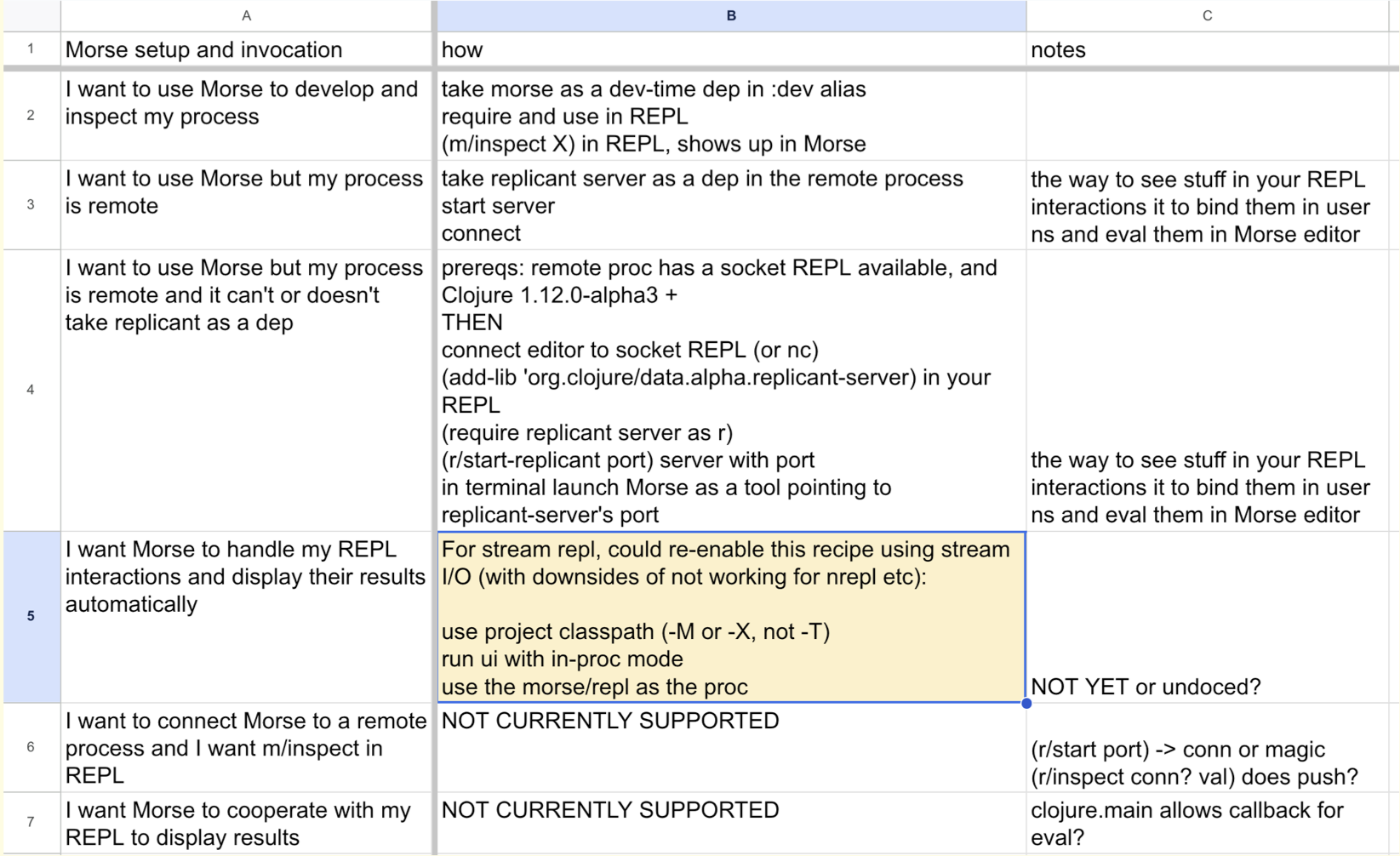
그래서 이것은 진짜입니다. 다시 한 번 말하지만, 우리는 정말 이 일을 합니다. 오늘 모스에 대해 다들 들어보셨죠? REBL의 후계자? 모스로 할 수 있는 일은 정말 많습니다. 모스를 사용할 수 있는 상황도 많고, 모스를 여러분의 물건과 연결할 수 있는 방법도 많아요.
저희는 그냥 브레인스토밍을 하고 있었어요. 이건 거창한 일이 아닙니다. 40분 동안 앉아서 이야기를 나눴는데, 이야기하는 동안 저희가 한 일이 바로 이것입니다. 이 시트를 만들었어요. 이 시트를 작성하고 무엇이 무엇인지에 대해 이야기했습니다. 하지만 이 사용 사례 단계에서는 A만 하기로 했죠? 이것은 열 B, 즉 방법도 보여주는 완성된 스토리입니다.
So this is real. Again, we really do this. Everybody heard about Morse today, maybe? REBL's successor? This is a lot of things you could do with Morse. A lot of context in which you could use Morse, and a lot of ways you might want to connect Morse to your stuff.
And we were just sort of brainstorming. And this is not a giant thing. We sat and talked for 40 minutes, and this is what we did while we were talking. We made this sheet. We filled it out, and we talked about what was what. But in this use case phase we would only do A, right? This is a completed story that shows column B, the how, as well.
[Time 0:39:08]
# Technique: Decision Matrix (DM)
slide title:  Technique: Decision Matrix (DM)

              _a (google or other live-editing) sheet_

    A:1 what decision are you trying to make, for which problem?

_Approaches_ - Columns (but first labels rows)
_Criteria_ - Rows (but first labels columns)
_Aspects_ - Cells

sheets > docs

  prose docs create a linearization that makes contrast difficult
이 단계의 또 다른 큰 기법은 의사 결정 매트릭스입니다. 이 강연의 핵심은 의사 결정 매트릭스에 대해 이야기하는 것입니다. 저는 주로 조직 모드(Emacs의 편집 모드 https://orgmode.org)에서 혼자서 디자인을 할 때 이 작업을 하곤 했지만, 이런 종류의 디자인, 이 디자인 단계, 이 작업을 하는 가장 좋은 방법은 스프레드시트에서 하는 것이라고 완전히 전환했습니다. 특히 실시간 편집 스프레드시트인 스프레드시트에 있습니다. 그래서 이 작업에는 Google 스프레드시트를 사용합니다 [ https://www.google.com/sheets/about ].
그렇다면 의사 결정 매트릭스란 무엇일까요? 스프레드시트입니다. 여러 사람이 동시에 보고 동시에 편집할 수 있는 스프레드시트입니다. 다른 사람이 있는지 모르겠습니다 ... Microsoft가 가지고 있다고 확신합니다.
A1은 다음과 같습니다. 어떤 결정을 내리려고합니까? 어떤 문제를 해결하고 있습니까? 항상 A1입니다. 내가 프로젝트에 와서 디자인 멘토링을 원하는데 A1이 채워지지 않았다면 우리는 무엇을 작업 할 것 같습니까? A1. 좋은 문제 진술서를 작성하세요.
여기에 문제 진술을 바로 복사할 수 있습니다. 하지만 종종 이것은 구체적인 결정에 더 가깝습니다. 하지만 그것과 관련이 있어야 합니다. 문제를 직시하는 것이 매우 중요합니다. 이 문제가 항상 나를 괴롭히는 것처럼 느껴져야 합니다.
그리고 내가 그것을 보고 있다는 것은 외부 자극으로 생각할 수밖에 없다는 것을 의미합니다. 그것도 중요합니다.
알겠어요. 그럼 어떻게 할 건가요? 문제 해결을 위한 다양한 접근 방식이 있을 것입니다. 이것이 여러분의 열이 될 것입니다. 첫 번째 열은 행을 표시하고 다른 열은 가능한 다양한 접근 방식을 표시합니다.
이 결정을 어떻게 내릴 것인가에 대한 기준이 있을 것입니다. 첫 번째 행 한두 개를 제외한 나머지 행이 열의 레이블이 됩니다.
마지막으로, 해당 기준의 관점에서 특정 접근 방식의 측면인 내부 셀이 있습니다. 이것이 내부 셀에 들어가는 내용입니다. 여기서는 문서보다 시트를 강력히 추천합니다. 문서는 선형적이며 대비를 지원하지 않는데, 이에 대해서는 잠시 후에 설명하겠습니다.
So the other big technique in this phase is the decision matrix. And this is the heart of the talk, is to talk about decision matrix. I used to do this when I was mostly designing by myself in Org mode [an editing mode in Emacs https://orgmode.org ], but I am a complete convert that the best way to do this kind of design, in this phase of design, and this work, is in a spreadsheet. And in particular, it is in a spreadsheet that is a live editing spreadsheet. So we use Google Sheets for this thing [ https://www.google.com/sheets/about ].
So what is a decision matrix? It is a spreadsheet. It is a spreadsheet that more than one person can see at the same time, and edit at the same time. I do not know if somebody else ... I am sure Microsoft has one.
A1 will be: what decision are you trying to make? What problem are you working on? Always A1. If I come up to your project and you want some design mentoring, and A1 is not filled in, guess what we are going to be working on? A1. Have a good problem statement.
You can copy your problem statement right in here. Often, though, this is more of a specific decision. But it should be related to that. Keeping your problem in your face is super important. It should just be always like this problem is just haunting me.
And I am seeing it, which means I am forced to think about it as an external stimulus. That is also critical.
All right. So what are you going to have? You are going to have different approaches to solving the problem. These will be your columns. The first of the columns will label the rows, but the other columns will be your various possible approaches.
You will have criteria: how are you going to make this decision? These will be the rows, except the very first row, or two, labels the columns.
And finally, you have the interior cells, which is the aspects of a particular approach from the perspective of that criteria. That is what goes in the inner cell. I do strongly recommend sheets over docs here. Docs are linear, and they do not support contrast, which I will talk about in a second.
[Time 0:41:05]
# Template: DM
slide title: Template: DM
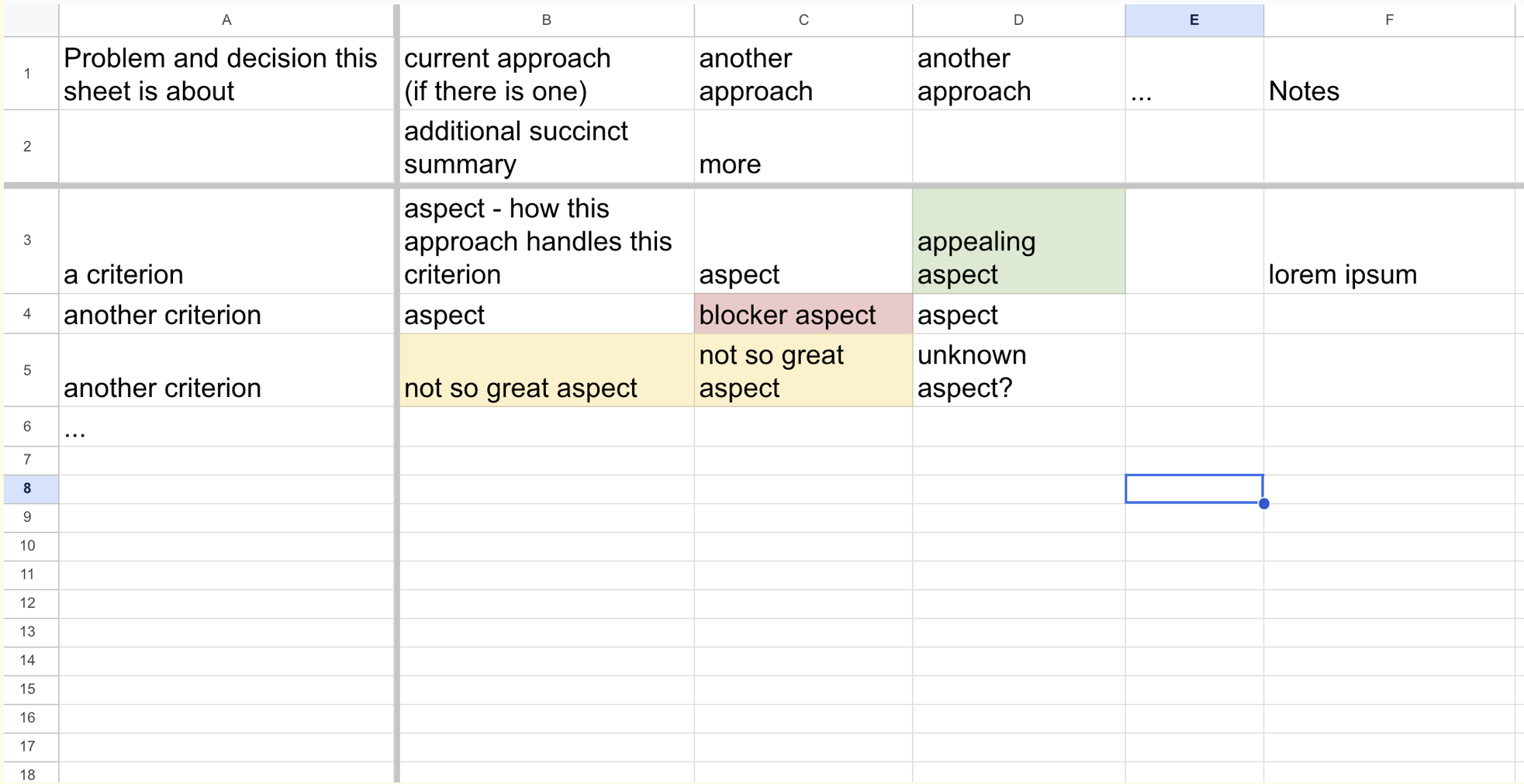
이것은 DM용 템플릿입니다. 이걸 확대할 필요는 없을 것 같습니다. 이것은 실제가 아닙니다. 그냥 템플릿일 뿐입니다. 왼쪽 위 모서리 A1: 어떤 문제를 해결하고 있나요?
[열] B C D E는 취하려는 접근 방식입니다. 이미 이 작업을 수행하고 있거나 이 영역에서 부족한 부분이 있는 시스템을 수정하는 경우 첫 번째 접근 방식을 사용하세요. 첫 번째 접근 방식은 아무것도 하지 않는 것입니다. 현재 어느 단계에 와 있나요? 지금 우리 시스템은 무엇을 하고 있나요? 일반적으로 그 열에는 뭔가 좋지 않은 것이 있을 것입니다. 그런 다음 다른 접근 방식을 시도할 수 있습니다. 이에 대해서는 잠시 후에 자세히 설명하겠습니다.
그 다음 행 아래에는 기준, 기준, 기준이 있습니다. 그리고 그 안에는 접근 방식이 기준을 어떻게 다루는지에 대해 이야기 할 측면이 있습니다.
So this is a template for a DM. I do not think I have to zoom this one in. This is not real. This is just a template. The upper left corner, A1: what problem are you working on?
[Columns] B C D E are the approaches you want to take. If you are modifying a system that already kind of does this, or has a lacking in this area, make that the first approach. The first approach is: do nothing. Where are we at? What does our system do right now? Usually, there will be something not great in that column. And then you will have other approaches. I will talk in detail about that in a second.
And then down the rows are criterion, criterion, criterion. And then inside we have the aspects, where we are going to talk about how the approach deals with criterion.
[Time 0:41:50]
# DM Columns: Approaches
slide title: DM Columns: Approaches

first row or two describe approach
- must give you shorthand for talking, yet make clear what about
- _succinct description_ of approach, use row 2 if needed
- freeze the approach title/description rows

  if you are modifying something, the first 'approach' should be the status quo

  columns for what others have done in same situation

  and your initial ideas

A DM is about _creating_ a great approach, not merely shopping

         _the answer is often an approach you don't begin with_
따라서 접근 방식은 상단에 레이블을 지정하는 것입니다. 다시 말하지만, 간결해야 하지만 엉뚱한 이름을 사용하지 마세요. 슈퍼 속기를 하지 마세요. 누군가가 당신의 문서에 다가와서 C열의 첫 번째 상자만 읽었다면, 그들은 C열이 실제로 무슨 내용인지 이해할 수 있을까요, 아니면 그 의미를 축약해 버린 것일까요? 첫 번째 줄처럼 제목에 가까운 문장으로 작성할 수 없다면 두 번째 줄에 문장 길이를 적어 넣으세요.
무슨 말을 하려는지 명확하게 알 수 있어야 합니다. 많은 사람들이 열이 있는데 이 열이 실제로 무엇에 관한 것인지 명확하지 않기 때문에 여기에서 어려움을 겪는 것을 보았습니다. 어떤 전략이나 어떤 접근 방식에 관한 것인지요. 두 가지를 구분할 수 있도록 충분한 세부 정보를 입력하세요.
그런 다음 해당 행을 고정하세요. 첫 번째 열, 첫 번째 접근 방식을 지금 여러분이 하고 있는 것과 비슷하게 사용하라고 이미 말씀드렸습니다.
다른 사람들이 무엇을 하는지 생각해 보세요. 이것은 "해먹 중심 개발"에 나오는 내용입니다.
[리치 히키, "컴퓨터에서 벗어나기, 또는 해먹 중심 개발", 2010년 10월, https://github.com/matthiasn/talk-transcripts/blob/master/Hickey_Rich/HammockDrivenDev-mostly-text.md ]에서 나온 내용입니다.
그리고 나서 여러분은 아마도 좋은 접근 방식에 대한 자신만의 첫 번째 아이디어를 갖게 될 것입니다.
여기서 제가 강조하고 싶은 것은 이것은 쇼핑 연습이 아니라는 점입니다. 우리가 하는 것, 다른 사람들이 하는 것, 그리고 내 첫 번째 아이디어가 있는데 그중 하나를 선택하자는 식이 아닙니다. 그런 것이 아닙니다. 서로 어떻게 다른지, 어떤 특성이 있는지 검토하는 과정을 거쳐 하나 이상의 새로운 칼럼, 새로운 접근 방식을 탄생시킬 수 있기를 희망하는 것입니다. 이곳은 혁신을 할 수 있는 곳입니다. 따라서 쇼핑이 아닙니다.
So the approach is we are going to label them in the top. Again, you need to be succinct, but do not take goofy names. Do not do super shorthands. If somebody walked up to your thing and they read just the first box of column C, would they understand what columns C was really about, or did you shorthand the meaning of it away. If you cannot get it done in something that is more like a title, like in row one, take a second row and put in a sentence length thing.
You need for what you are talking about to be super clear. I have seen a lot of people just struggle here because they have columns and it is not actually clear what this column is about. What strategy or what approach this is about. Put enough detail in there so you can distinguish the two.
And then freeze those rows. I already talked about using the first column, first approach, to be like what you do right now.
You want to think about what other people do. This is stuff from "Hammock-driven Development".
[ Rich Hickey, "Step Away from the Computer, or Hammock-driven Development", October, 2010 https://github.com/matthiasn/talk-transcripts/blob/master/Hickey_Rich/HammockDrivenDev-mostly-text.md ]
And then you are going to have your own first ideas about possibly good approaches.
The main thing I want to do here is, I want to emphasize, this is not a shopping exercise. This is not just like: well, I have got what we do, what other people do, and my first idea, and we are going to pick one. That is not what it is about. It is about going through the exercise of examining how they differ from each other, what their qualities are, and hopefully driving the birth of one or more new columns, new approaches. This is a place where you can innovate. So it is not it is not shopping.
[Time 0:43:23]
# DM Rows: Criteria
slide title: DM Rows: Criteria

                    'means of judging/deciding'

First column - _succinct descriptions_ of criteria (freeze this column)
Include criterion iff salient or relevant, sort by importance, distinction

will usually include rows for

  fitness for solving the problem (from use cases)

  various '-ilities'

  costs (time, dev effort, $), risks

  compatibility, complexity

  etc - purpose built for problem (reflective)
알겠습니다. 기준. 이 단어는 매우 중요합니다. 그것은 특징이 아닙니다. 그것은 기준입니다. 기준. 그것은 판단, 결정의 수단입니다. 비평가. 비판적. 이 모든 단어는 결정을 내리고 사물에 대해 긍정적이고 부정적인 것을 말하여 판단하는 것에 관한 것입니다.
하지만 그 판단의 근거는 무엇일까요? 글쎄요, 그것은 반성해야 할 것입니다. 그것은 문제가 아닙니다. 문제를 해결하는 것에 대해 어떻게 느끼는지에 있습니다. 그 중 일부는 문제에 의해 주도된다는 뜻입니다. 만약 여러분의 접근 방식이 문제를 전혀 해결하지 못한다면, 두통이 사라지지 않는다면, 그것은 누군가의 두통을 없애기 위한 접근 방식이 아닙니다.
따라서 문제 해결을 위한 몇 가지 행이 있지만, 잠재적으로 이 접근 방식의 메타 특성에 관한 다른 행이 많이 있을 것입니다. 개발 시간은 얼마나 걸리나요? 이전에 수행한 작업과 호환되나요? 혹시 문제가 생기지는 않을까요? 비용은 얼마나 드나요? 운영 비용은 얼마나 드나요? 어떤 규제에 의해 허용되는가?
행의 후보가 될 수 있는 많은 것들이 있을 것이지만, 미리 모든 것을 열거해서는 안 됩니다. 문제를 해결할 때마다 중요한 것을 선별하여 중요한 것만 넣어야 합니다. 따라서 눈에 띄거나 관련성이 높은 것이 좋습니다. 두드러진다는 것은 눈에 띄는 측면이 있다는 뜻이고, 관련성이 있다는 것은 문제와 관련된 측면이 있다는 뜻입니다.
열 중 하나가 살아있는 토끼이고 다른 열이 토끼 옷을 입은 탱크인 경우, "털 색깔은 어떤 색인가요?" 또는 "털은 얼마나 부드럽나요?"와 같은 행을 만들지 않을 것입니다. "양상추는 얼마나 먹나요?", "트럭을 부술 수 있나요?", "어떤 종류의 탄약이 필요하나요?"라는 행이 있을 것입니다. 이 두 가지를 정말로 구별하는 것들. 탱크의 무게가 얼마인지 모르겠어요? 우리는 정말 정말 무거운 토끼를 원하지 않습니다. 알았어요. 그래서 그것은 특성이 아니라 기준입니다.
All right. Criteria. This word is very important. It is not characteristic. It is criteria. Criteria. It is a means of judging, deciding. Critic. Critical. All those words are about making a decision, and about saying positive and negative things about things so that you can judge.
But what is the basis for that judgment? Well that is something that has got to be reflective. It is not in the problem. It is in how you feel about addressing the problem. I mean that some of it is driven by the problem. If your approach does not solve the problem at all, if it does not make the headache go away, well it is not really an approach to getting rid of somebody's headache.
So you will have some rows for solving the problem, but you will have a bunch of other rows, potentially, that are about meta characteristics of this approach. How much development time does it take? Is it compatible with what we have done before? Is it going to possibly break things? How much does it cost? How much will it cost to operate? Is it allowed by some regulatory thing?
You are going to have a bunch of things that are candidates for rows, but you should never fully enumerate them in advance. Every time you take on a problem, you are going to need to be selective about what matters, and only put in what matters. So you want things that are salient or relevant. Salient means it is an aspect of this thing that sticks out, and relevant means that it is an aspect of this thing that matters to our problem.
If you have one of your columns is a live bunny, and another one of your columns is a tank in a bunny suit, you are not going to have a row that is "what color is the fur?" or "how soft is it?" You are going to have a row that says "how much lettuce does it eat?" and "can it crush a truck?" and "what kind of ammunition does it need?" The things that really distinguish these two things. I do not know how much does a tank weigh? We do not want a really, really, heavy bunny. All right. So it is not characteristics, it is criteria.
[Time 0:45:31]
# DM Cells: Aspects
slide title: DM Cells: Aspects

                     _of approach per criterion_
   _succinct description_ of how approach handles criterion (or doesn't)
          avoid y/n/true/false/numeric-rank criteria, and in cells

_avoid judgement in text_, instead use (unsaturated!) cell background color

  Neutral - clear

  Some challenge or negative - yellow

  Seems blocking or failing to address problem - red

  Seems particularly desirable/better - green
그리고 나서 우리는 측면을 가질 것입니다. 이것은 다시 내부 셀에 들어가는 간결한 설명입니다. 여기에 몇 가지 단어를 쓰고 싶을 것입니다. 이 관점에서 이 접근 방식을 생각할 때, 또는 이 기준의 관점에서 이 접근 방식을 볼 때 - 이것이 바로 측면이 의미하는 바, 즉 무언가를 바라보는 것입니다. 이 관점에서 보면 이렇게 보입니다.
여기서는 예, 아니오, 참, 거짓 등의 단어가 아니라 단어가 되어야 합니다. '예, 그렇습니다'가 아니라 '어떻게 그렇습니다'라고 말하세요. 두 가지 대답이 모두 "예"이지만 어떻게 하는지는 다를 수 있으므로 어떻게 하는지를 말하세요. '예'가 아닌 '어떻게'를 적으세요. 예, 있습니다. 백업 전략이 있나요? 네, 그렇습니다. 플로피 디스크를 사용할 수도 있고 복제를 사용할 수도 있습니다. 그렇게 말하세요.
여기서 또 하나 주의해야 할 점은 텍스트에 주관적인 판단을 넣지 말아야 한다는 것입니다. 그러지 마세요. 그냥 사실 그대로를 쓰세요. 이 관점에서 보면 이 글에는 이런 내용이 있습니다. 아니면 이런 것이 없을 수도 있습니다.
그런 다음 제가 옹호하고 우리가하는 일은 이전에 보셨던 색상을 사용하여 주관성을 보여주기 위해 시트에 몇 가지 색상을 사용하는 것입니다. 시트에서 주관성을 사용하는 유일한 곳입니다. 그냥 괜찮을 것 같으면 중립적이고 선명하게 남겨둡니다. 이 접근 방식이 이 기준을 다루는 방식에 문제가 있거나 부정적인 특징이 있는 경우 노란색으로 색상을 지정합니다. 이 방식이 완전히 차단하는 것처럼 보이는 경우, 즉 우리에게도 금지되고 사용자에게도 금지되며 문제에 대한 답을 얻지 못하는 경우 빨간색으로 표시합니다. 따라서 일종의 차단입니다. 그리고 다른 것보다 특히 좋거나 바람직하거나 더 나은 경우 녹색으로 표시합니다.
간단히 말해서 장단점 행으로 시작할 수 있습니다. 여기에 제 접근 방식이 있습니다. 여기에 이것의 장점이 있고 여기에 단점이 있습니다. 하지만 문제는 두 라이브러리 중에서 하나를 선택해야 하는데 한 라이브러리는 "지연 시간이 정말 짧습니다"라고 말하고 다른 라이브러리는 "처리량이 정말 높습니다"라고 말할 수 있다는 것입니다. 그리고 이것이 바로 그 특징입니다. 좋아요, 두 가지 장점이 있습니다.
하지만 지연 시간이 얼마나 되는지 기준으로 높은 처리량을 살펴본 적이 없고, 지연 시간이 얼마나 되는지 관점에서 낮은 처리량을 살펴본 적이 없습니다. 따라서 모든 기준이 고유한 행을 갖도록 이러한 항목을 세분화하기 전까지는 대조할 수 없습니다.
우리가 하려는 것은 서로 다른 것들을 나란히 배치하는 것입니다. 그것이 우리의 마음을 움직이는 것입니다. 우리는 가장자리를 좋아합니다. 우리는 가장자리를 보는 것을 좋아합니다. 아이디어에 가장자리를 만들어야 합니다. 그것이 당신의 생각을 촉발시킬 것입니다.
And then we are going to have the aspects. This is, again, a succinct description that goes in the inner cell. You really want to write some words here. You really want to help people understand: when you think about this approach from this perspective, or when you look at this approach from the perspective of this criteria -- that is what aspect means: look at something. When you look at it from that, this is what you see.
It should be words here, not yes, no, true, false, that kind of stuff. Try to say: if it does it, say how it does it, not that yes it does it. Say how it does it, because you are going to have two different answers that both have a "yes", but how they do it differs. Write down how they are doing it, not just yes they do it. Yes, they have it. Do they have a backup strategy? Yes, yes. Well, one may use floppy disks, and one may use replication. So say that.
The other thing you want to do here is: you want to avoid subjective judgment in your text. Do not do that. Just write what the facts are. When we look at this from this perspective, this is what it has. Or maybe, it does not have this.
And then what I would advocate, and what we do, is we use colors, which you saw before, some colors on the sheet to show subjectivity. This is the only place that we use subjectivity on the sheet. If something is just OK for this, we leave it neutral, clear. If there is some challenge or negative characteristic to the way that this approach deals with this criterion, then we will color it yellow. If the way it does it seems completely blocking -- it is prohibitive to us, prohibitive to the user, failing to answer the problem, we will color it red. So it is kind of blocking. And if it is particularly nice, desirable or better than the others, we will color it green.
You can, as a shorthand, just start with pros and cons rows. Here is my approaches. Here is the pros of this, and here is the cons of this. But the thing is, maybe you are picking between two libraries, and one of the libraries says "I have really low latency" and the other one says "I really have high throughput". And these are their features. Well okay, that is two pros.
But you have not looked at the high throughput one on the basis of what is its latency, and you have not looked at the low latency one from the perspective of how is its throughput. So until you have broken up these things so that every criterion gets its own row, you are not going to have the ability to contrast.
What we are trying to do is to get things next to each other that are different. That is what makes our mind go. We love edges. We love seeing edges. You need to create edges in your ideas. That is what is going to trigger your thinking.
[Time 0:48:22]
# Example: DM
slide title: Example: DM
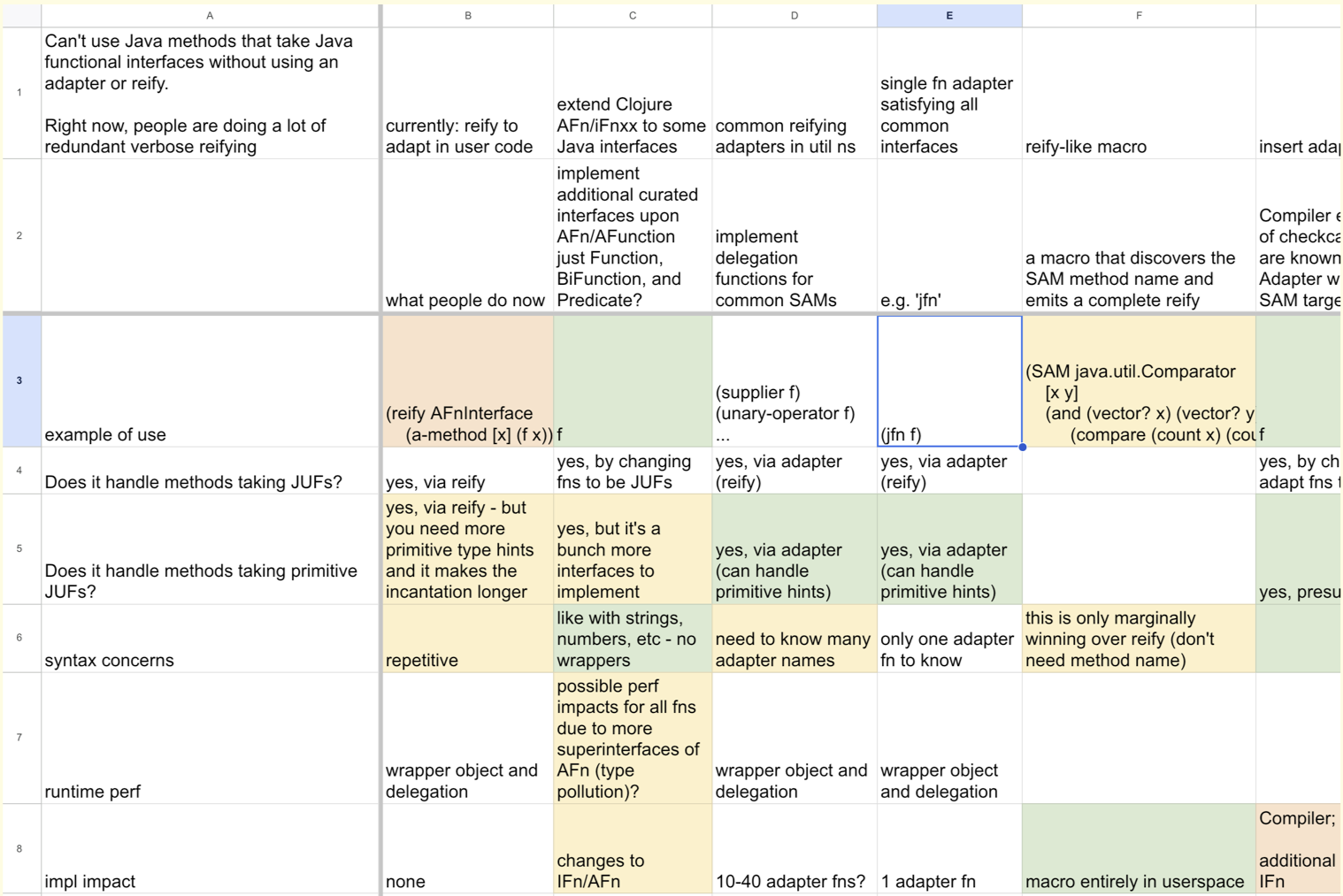
이것은 우리가 생각하고 있는 실제 DM입니다. 아직 출시할 예정은 아닙니다.
클로저에서 함수형 인터페이스는 어떻게 처리하나요? 여러 가지 방법이 있습니다. 이 시트는 저쪽으로 가서 [오른쪽으로 스크롤하여 적어도 G 열까지 스크롤하고 있습니다].
하지만 A1에 간결한 문제 진술이 있습니다. 오늘날에는 어댑터나 리파이프를 사용하지 않고는 Java 메서드를 사용하여 Java 함수 인터페이스를 가져올 수 없습니다. 열 B는 오늘날 우리가 가지고 있는 것입니다. 사람들은 리파이프를 많이 작성하고 있습니다. 그들은 타겟팅하려는 유형을 알아야 합니다. 중복되는 내용이 많습니다. 이 열은 노란색과 빨간색, 노란색 사이에 있는 주황색이 많이 있습니다. 그리고 좋은 다른 접근 방식도 있습니다. 완전히 놀라운 것은 드뭅니다.
This is a real DM here we are thinking about. This is not something we are shipping yet.
How do we deal with functional interfaces in Clojure? There is a lot of ways to do it. This sheet goes, goes over there [as he is scrolling to the right up to column G at least].
But there is a concise problem statement in A1: You cannot use Java methods to take Java functional interfaces without using an adapter or reify today. Column B is what we have today. People are writing reify a lot. They need to know the types that they are trying to target. It is a lot of redundant stuff. That column is kind of a lot of orange, which is between yellow and red, and yellow. And then there are other approaches which are good. It is rare that something is totally amazing.
[Time 0:49:14]
# DM: Tips
slide title: DM: Tips

Avoid
_the all-green column_ - are you rationalizing?
_undistinguished columns_ - find the differences that matter
_exhaustive or template rowsets_ - s.b. specific criteria, not just characteristics
_links as primary cell content_ - ok as supplement to summary text in cell
_hidden comments/popups etc_ - keep things in view
_phrasing criteria as questions_ - clash with inline questions

include questions as soon as they arise!

  put '?' anywhere (approach/criterion/aspect)

    - if you are unsure of importance

    - or the info is unknown
좋은 DM을 작성하기 위한 몇 가지 팁을 알려드리겠습니다. 녹색 열은 모두 피하세요. 그럴 가능성은 거의 없습니다. 그것은 당신이 합리화하고 있을지도 모른다는 신호입니다. 완전히 멋진 것은 없습니다.
구분되지 않는 열은 피하세요. 두 열을 살펴봤는데 어떤 식으로든 다르지 않다면 행을 놓치고 있을 가능성이 높습니다. 두 열을 구별하는 기준이 누락되었을 수 있으며, 이를 찾고 싶을 것입니다.
앞서 말했듯이 완전한 행 집합을 원하지 않습니다. 미리 정의된 행 집합을 원하지 않으며, 가능한 모든 접근 방식의 모든 특성을 원하지 않습니다. 중요한 것만 찾으면 됩니다.
그리고 끊임없이 상승하세요. 스프레드시트의 또 다른 장점은 행을 위로 이동할 수 있다는 점입니다. 행을 드래그하기만 하면 위로 올라갑니다. 따라서 스프레드시트에서 다른 접근 방식과 가장 차별화되는 항목을 계속 위로 밀어 올리세요. 이 관점에서 보면 모든 것이 똑같은 페이지와 페이지에 신경 쓰는 사람은 아무도 없습니다.
링크나 참조를 기본 셀 콘텐츠로 사용하지 마세요. 거기에 무언가를 작성하세요. 사고의 관점에서 중요한 것은 중요한 내용을 보는 것입니다. 링크만 있으면 아무것도 보이지 않습니다. 집중력을 깨고 가서 링크를 따라가야 합니다. 링크는 보조 수단으로 사용할 수 있습니다.
댓글을 허용하는 이러한 것의 기능을 사용하지 마세요. 구석에 작은 삼각형이 보입니다. 그게 뭐죠? 마우스를 가져가거나 클릭해야 하는데 이제 여기에 있습니다. 무언가에 대해 궁금한 점이 있거나 좋지 않다고 생각되면 옆에 있는 셀이나 메모에 적으세요. 많은 항목에 '메모' 열이 있는 것을 볼 수 있습니다. 다른 사람이 볼 수 있도록 메모에 적으세요. 이제 상대방이 여러분의 생각을 볼 수 있도록 선택할 필요가 없습니다. 여러분은 여러분이 생각하는 바를 말했고, 상대방이 그것을 보게 되었으니까요.
그리고 기준을 질문으로 표현하지 마세요. 시트에 질문을 작성하고 검색할 수 있기를 원하기 때문입니다. 진행하면서 "이걸로 할 수 있을까? 이게 충분히 빠를까? 이걸 고려해야 할까?"라고 생각하게 됩니다. 기준을 "이 물음표가 있는가? 저 물음표가 있나요?"라고 하면 물음표를 검색하여 질문을 찾을 수 없습니다.
So some tips about doing a good DM. Avoid the all green column. That is very unlikely. That is a sign you might be rationalizing. Nothing is totally wonderful.
Avoid undistinguished columns. If you go through in those two columns and they are not different in any way, you are probably missing a row. You are probably missing some criteria that distinguishes them, and you want to find it.
I talked before, you do not want an exhaustive row set. You do not want a predefined row set, and you do not want every characteristic of every possible approach. You just want the ones that matter.
And relentlessly move up. The other nice thing about a spreadsheet is: you can move rows up. You just drag them and they go up. So keep pushing up on your spreadsheet on the things that most distinguish your different approaches. No one cares about pages and pages of everything's the same on this from this perspective.
Avoid links or references out as your primary cell content. Write something there. The key here from a thinking standpoint is: you are seeing the stuff that matters. If it is a link, you are seeing nothing. You have got to go break your concentration and go follow the link then. You can have links as supplements.
Do not use the features of these things that allow comments. I see a little triangle in the corner. What is that? I have got to hover or click and now it is over here. If you have a question about something, or you think it is bad or whatever, just write it on the cell next to it, or in the notes. You will see a lot of these things have "Notes" columns. Just write it in the notes so it is in someone's face. Now they do not have to opt into seeing what you think. You said what you think, and you put it in their way.
And then avoid phrasing the criteria as questions. This is because you want to be able to write questions in your sheet, and you want to be able to search for them. As you were going you are like, "I wonder if this can do this? I wonder if this will be fast enough? I wonder if we should be thinking about this thing?" If you phrase your criteria as, "Does it have this question mark. Does it have that question mark," then you cannot search for question mark and find your questions.
[Time 0:51:19]
slide title: DM: Outputs

a succinct _description of the problem/decision_ being taken on
a set of _several approaches_, succinctly described
an explicit and clear expression of _what matters in making the decision_
_detailed aspects_ for all of the approaches per criterion
- aligned for contrast

at-a-glance, fine-grained _subjective assessment_
- subjectivity all in one place (cell color)

  a set of questions for follow up

                _clear benefits + tradeoffs_
All right, so what do you get when you do this? You are going to have a good description of the problem. You are going to have a bunch of approaches with good descriptions of those. You will have made decisions about what matters. You will have done that introspection, so it is reflective. You will have details about how everything approaches it.
And you will have an at-a-glance subjective assessment, so if I am coming into your thing and you have done this, I can quickly see what you think is good or bad, or where you think the trade-offs lie. And all the subjectivity is in one dimension. If I do not agree with you, I can take your sheet, dupe it, and change all the colors to blank, and I will be dealing with something with no subjectivity left.
이렇게 하면 어떤 결과를 얻을 수 있을까요? 문제에 대한 좋은 설명을 얻게 될 것입니다. 문제에 대한 좋은 설명과 함께 여러 가지 접근 방식을 갖게 될 것입니다. 무엇이 중요한지에 대한 결정을 내렸을 것입니다. 성찰을 통해 반성적인 성찰을 했을 것입니다. 모든 것이 어떻게 접근하는지에 대한 세부 사항을 갖게 될 것입니다.
그리고 주관적인 평가를 한눈에 볼 수 있으므로 제가 여러분의 업무에 들어와서 이 작업을 수행하면 무엇이 좋다고 생각하는지, 나쁘다고 생각하는지, 장단점이 어디에 있다고 생각하는지 빠르게 파악할 수 있습니다. 그리고 모든 주관성은 한 차원에 있습니다. 내가 동의하지 않으면 시트를 가져다가 속이고 모든 색상을 공백으로 바꿀 수 있으며 주관성이 남아 있지 않은 것을 다루게 될 것입니다.
[Time 0:52:02]
# DM: Benefits
slide title: DM: Benefits

come back later/arrive late - (re)load context

live group thinking tool - make everything visible as text
- vs voice + independent notes

promotes shared understanding
- call out ambiguity, inconsistency etc
- raise and capture questions and ideas immediately

_birthplace of abstraction_

               _provocation for background thought_
                        hammock, sleep
           where new columns and best answers are born
이렇게 하면 어떤 이점이 있을까요?
물론 나중에 다시 돌아와서 작업을 재개할 수 있습니다. 다른 사람이 생각 과정에 참여하여 늦게 도착해서 따라잡을 수 있습니다. 한 명 이상이 작업하는 동안 모두가 시트를 볼 수 있습니다. Zoom에 모여서 각자 따로 메모를 하고 그 메모를 조정하는 것보다 훨씬 낫습니다. 우리는 항상 시트를 만들어서 얼굴에 대고 대화하는 동안 그 안에 타이핑을 합니다.
이렇게 하면 서로의 이해를 공유할 수 있습니다. "나는 당신이 그렇게 말하는 것이 옳지 않다고 생각합니다. 저는 그렇게 생각하지 않습니다."라고 말할 수 있습니다. 좋은 방법입니다. 이것이 바로 소크라테스식 질문법입니다: 정말 사실입니까?
이런 식으로 잘라내고 기준을 고르는 과정에서 일어나는 또 다른 일은 추상화를 시작한다는 것입니다. 다섯 가지 선택지가 있었는데 이걸 할 수 있는 방법은 두 가지뿐이라는 것을 확인하려고 하는 것입니다. 문제의 물리학을 배우는 것입니다. 이를 수행하는 방법은 두 가지뿐입니다. 방법은 하나뿐입니다. 모두가 같은 방식으로 합니다. 다른 방법이 있을 수도 있습니다. 질문을 해보세요.
그리고 나중에 추상화할 수 있는 특성을 찾고 있습니다. 그리고 이런 식으로 낮에 이 작업을 하면 해먹이나 침대에 누웠을 때 새로운 아이디어를 얻을 수 있을 거예요.
All right, so what are the benefits of having done this?
Well certainly you get to come back later and resume your work. Somebody else can join you in the thought process, and arrive late and catch up. While more than one person is working on this, you all can be looking at the sheet. This is so much better than just gabbing on Zoom and having everybody take independent notes, and then maybe trying to reconcile those notes. We always make a sheet and stick it in our face and type into it while we are talking.
And it means that you are going to have shared understanding. You are going to be able to say, "I do not think you are saying that right. I do not think that that is the case." That is good. That is the Socratic method, questioning: Is that really true?
The other thing I think happens as you have done this sort of cutting up, and pick the criteria, is: you are starting to do abstraction. You are trying to see, well I had five possible choices, but only two ways to do this. You are learning the physics of the problem. There is only two ways to do this. There is only one way to do that. Everybody does it the same way. Maybe there should be another way. You could ask the question.
And you are finding characteristics that maybe you want to lift later, as abstraction. And then this is the kind of thing, if you do this during the day, I promise you, you are going to get new ideas when you hit the hammock or the bed.
[Time 0:53:18]
# Phase: Design
slide title: Phase: Design

               _tactics, implementation plan_
                  the blueprint-like design

_What do you know?_ the problem and the direction we are taking to solve
_What do you need to know?_
- the possible implementation approaches
- the best of these
- what matters in deciding
- how the users will use your solution
좋아요, 다음 단계는 디자인입니다. 제가 의도적으로 디자인을 설계의 한 단계로 설정한 이유는 이 설계는 '실행 계획을 표시하는 것'이기 때문입니다. 이것이 실제 전통적인 디자인 개념입니다. 디자인이란 무엇인가에 대한 맥락을 넣는다는 것은 사실 여기서부터 시작할 수 없기 때문입니다. "저는 디자인을 하고 있습니다. 이것이 제가 가장 먼저 할 일입니다. 무엇을 어떻게 만들지 고민해야 합니다. 이제 보시다시피, 가치 있는 다른 모든 것들을 건너뛰게 될 것입니다.
이제 여러분은 실제로 다음과 같은 단계로 내려갈 것입니다. 우리는 그것이 안경이라고 생각합니다. 이제 우리는 그것을 만드는 방법을 알아 내려고 노력할 것입니다. 아니면 손잡이가 필요하다는 것을 알았으니 어디에 놓을지 고민해야 할 수도 있습니다. 그리고 그립감이 있어야 할까요, 아니면 미끄러워야 할까요? 힌트: 그립감이 있어야 합니다. 고정되어 있어야 하나요? 네, 고정되어 있어야 합니다. 알잖아요. 이런 거요.
알았어요. 그래서 우리가 아는 게 뭐죠? 우리는 이미 문제와 방향을 알고 있습니다. 그리고 당신은 이것을 봅니다. 당신은 힘을 얻고 있습니다. 당신은 속도를 얻고 있습니다. 자신감을 얻고 있습니다. 당신은 당신이 나아갈 방향을 알고 있습니다.
무엇을 알아야 할까요? 어떤 접근 방식을 택할지는 알지만 어떻게 구현할지는 정확히 알지 못할 수도 있습니다. 지금은 "API는 어떤 모습일까요?"와 같은 이야기를 할 때입니다. API를 만들기로 결정했습니다. 또는 사람들이 직접 사용할 수 있는 라이브러리를 만들기로 결정했습니다. 자동화하지는 않을 것입니다. 하지만 이제 여러분은 "그 API는 어떤 모습일까? 서명은 어떻게 될까?"라고 질문할 것입니다.
똑같은 일이 일어날 것입니다. 바라건대, 여러분은 하나 이상의 아이디어를 만들어낼 것입니다. 그런 다음 가장 좋은 것을 선택하려고 노력할 것입니다. 결정할 때도 동일한 기법을 사용해야 합니다. 기준.
여기서 새롭고 다른 점은 이전에는 사용자의 의도가 무엇인지 자세히 알고자 하는 접근 방식이었습니다. 이제 구현 결정을 내릴 때 사용 사례 시트로 돌아가서 "우리가 만들고자 하는 솔루션이 주어졌을 때 이렇게 하면 의도를 달성할 수 있습니다."라고 말할 수 있습니다. 그리고 지금 우리가 선택하고 있는 구현 결정도 마찬가지입니다.
All right, and then the next phase of design is design. And I purposely made design a phase of design because this design is about "mark out a plan for doing it". This is the actual traditional notion of design. By putting the context of what is design -- because you actually cannot start here. You cannot just say, "I am doing design. This is the first thing I am going to do. I am going to start figuring about how I am going to make something. You see now, you will have skipped over all this other stuff that is valuable.
So now you will actually be down to: all right, we have an approach chosen to take. We think it is the eyeglass thing. Now we are going to go and try to figure out how to make it. Or maybe we figured out we are going to want a knob, and we have to figure out where to put it. And should it be grippy, or should it be slidy? Hint: it should be grippy. Should it be detented or not. Yes, it should be detented. You know. This kind of stuff.
All right. So what do we know? We know the problem and the direction already. And you see this. You are gaining power. You are gaining velocity. You are gaining confidence. You know the direction you are going to take.
What do you need to know? Well you you have got maybe an approach you are going to take, but not exactly how you are going to implement it. Right now is where you would be talking about like, "What is the API going to look like?" We have decided to make an API. Or, we have decided to make a library for people to use to do it on their own. We are not going to automate it. But now you would be talking about like, "What is that API going to look like? What is the signatures going to be?"
The same thing is going to happen. Hopefully, you are going to create more than one idea. Then you are going to try to pick the best. You are going to use the same techniques to decide. Criteria.
The other thing that is new here and different is before with approach we wanted to know in detail what are the user's intentions. Now we get to talk about: as we make implementation decisions, we can go back to that use cases sheet and say, "this is how they will accomplish their intention, given the solution that we are intending to make." And the implementation decisions we are choosing right now.
[Time 0:55:25]
slide title: Phase: Design (cont.)

_Where are you at?_ Have use cases and strategy/direction DM
_Where are you going?_

  implementation approach DM(s)

  design (plan) diagrams

  implementation decisions

  add detail to Approach section of top story

  fill in 'How' column in Use Cases

    how user can accomplish using feature/API etc

    _possible scope adjustment or backtracking if impl poses new challenges_
그래서 무엇을 얻었나요? 사용 사례와 이 DM이 있습니다. 더 많은 DMS를 받게 될 것입니다. 15분 정도의 아주 가벼운 운동이 될 수 있습니다. 우리는 이 선택을 해야 합니다. 여기서 뭔가 해야 합니다. 우리의 선택은 무엇일까요? 바로 '붐'입니다. 이것들의 장단점은 무엇일까요? 이것, 저것, 또는 다른 것. 매우 가벼울 수 있습니다. 모든 결정에 대해 고민하자는 것이 아닙니다. 가능한 한 자주 다른 사람을 배려하는 노력을 하라는 이야기입니다.
이럴 때 다이어그램을 작성할 수 있습니다. 이러한 DMS를 수행한 결과로 구현 결정을 내리게 될 것입니다. 접근 방식과 현재 방향성이 있는 스토리 부분으로 돌아가서 세부 사항을 추가할 것입니다.
다른 부분을 기억하실지 모르겠지만, 이 문제에 대해 어떻게 할 것인지에 대해 말씀드렸습니다. 우리는 이 세 가지 API를 갖게 될 것입니다. 그리고 여러분은 이 작업을 수행할 수 있을 것입니다.
그런 다음 사용 사례로 돌아가서 "어떻게?" 열을 채우면 됩니다. 이전에 말씀드린 것처럼 구현 세부 사항을 수행하는 과정에서 실제로 돌아가서 범위를 변경해야 할 수도 있습니다. 우리는 이 작업을 할 것이라고 생각했지만, 너무 많은 작업이 필요하거나 이미 가지고 있는 코드를 변경하는 데 너무 위험하지 않은 구현 방법을 찾지 못했습니다. 그리고 우리는 그렇게 많은 변경의 위험을 감수하고 싶지 않았습니다. 그리고 백업할 것입니다.
So what do you got? You have the use cases and you have this DM. You are going to have more DMS. These can be very light 15-minute exercises. We need to make this choice. We need to do something here. What are our choices? Boom. What is the trade-offs of these things? This, that, or the other. It can be very lightweight. I am not talking about suffering over every decision. I am talking about just trying to be considerate, as often as you can.
This is when you may do diagramming. You are certainly going to, as an outcome of doing these DMS, you are going to make implementation decisions. You are going to go back to that part of the story which is the approach, and which has the direction in it right now, and you are going to add the details.
I do not know if you remember back to the other thing, but we said like what are we going to do about this problem? We are going to have these three APIs. And you are going to be able to do this.
And then you are going to go back to your use cases and fill in the "How?" column. It is certainly possible that in doing -- I talked about this before -- in doing the implementation details, you may actually need to go back and alter your scope. We thought we were going to do this, and we did not find a way to implement it that was not going to be too much work, or too possibly risky in altering code that we already had. And we do not want to take on the risk of that much change. And then you are going to back up.
[Time 0:56:48]
# Example: Impl DM
slide title: Example: Impl DM
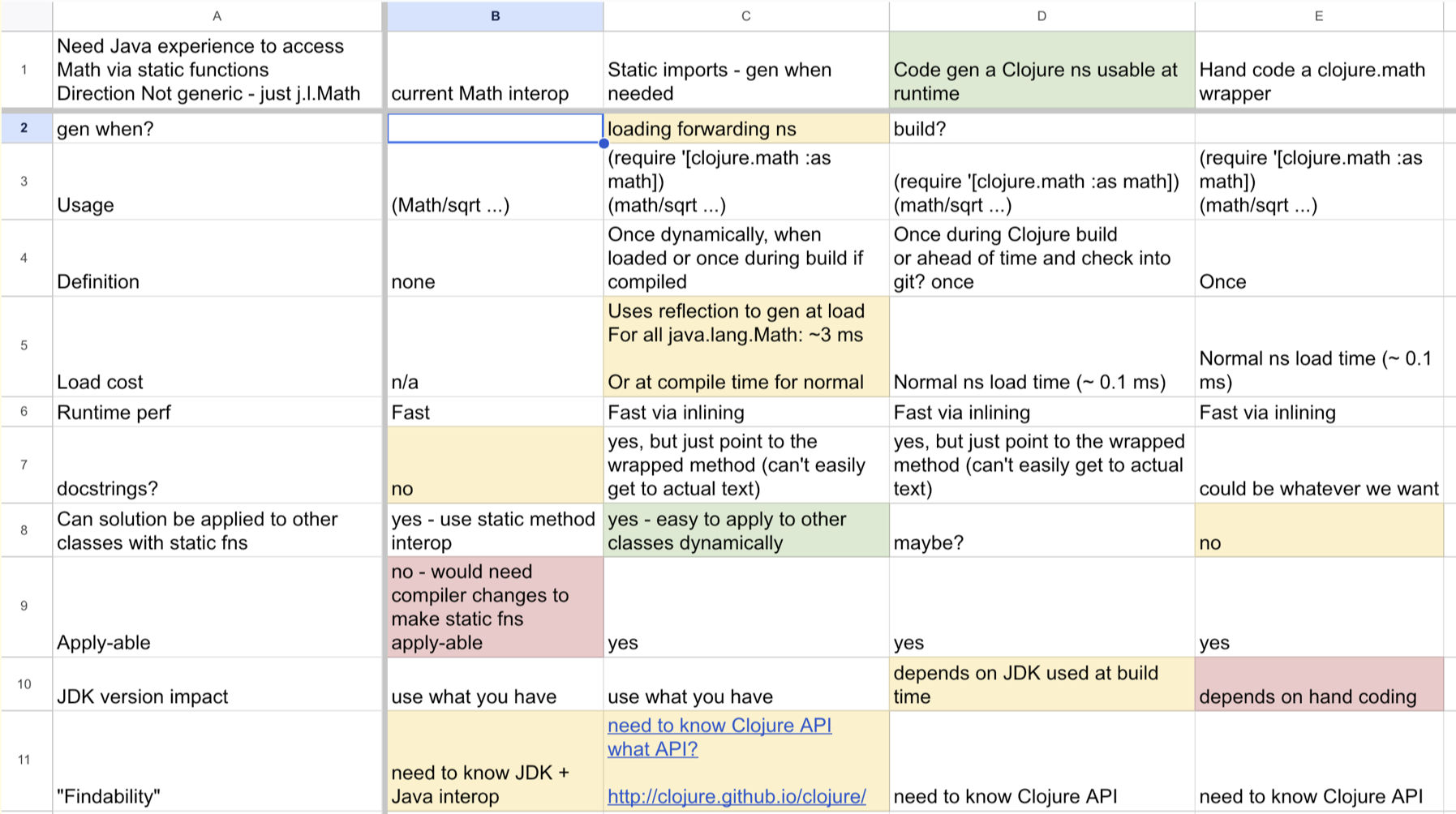
이것은 우리가 이미 배포한 것에 대한 실제 구현 DM입니다. 이 문제가 있었습니다. 클로저를 처음 접하는 사람들은 자바를 모릅니다. 그들은 자바 수학이라는 것이 있다는 것을 모르고 코사인을 수행하는 방법도 모릅니다. 그리고 그것은 사람들에게 바로 이 장애물입니다.
하지만 이에 대해 할 수 있는 다양한 방법이 있습니다. 아무것도 하지 않고 "좋아, 자바 문서를 찾는 더 좋은 방법을 알려주겠다."라고 말할 수도 있습니다. 그래서 우리는 이러한 특성을 가지고 있습니다. 똑같은 것입니다. 정적 가져오기를 할 수도 있습니다. Java에서 무언가를 생성하는 프로그램을 만들 수도 있습니다. 아니면 직접 코드를 작성하고 장단점을 살펴볼 수도 있습니다. 그래서 그렇게 했습니다.
This is a real implementation DM for something we did already ship. We had this problem. Newcomers to Clojure do not know Java. They do not know there is a Java math thing, and they do not know how to do cosine. And it is just this hurdle for people.
But there is a lot of different things you could do about it. You could do nothing, and say, "All right, we will give you a better way to find the Java doc." So we have these characteristics. The same thing. We could do static imports. We could have a program that gens the thing from the Java, which is what we ended up doing. Or we could hand code and we were looking at these trade-offs. So that is how we do that.
[Time 0:57:35]
# Technique: Diagrams
slide title: Technique: Diagrams

              _details out of scope for this talk_

important complement for tables and prose, better for:

  architecture

  flows

  relationships

  representations/layouts

  UI

        _diagram your problems, not just your solutions_
다이어그램은 범위를 벗어납니다. 다시 한 번 말씀드리지만, 이 부분에 대해서는 한 시간 동안 이야기할 수 있습니다. 하지만 산문과 표가 부적절할 때 이 방법을 사용하고 싶을 것입니다. 흐름, 사물 간의 관계, 시각적 표현에 대해 이야기할 때 시각적 표현이 매우 중요한 경우가 많습니다. 그래서 그렇게 하고 싶겠죠.
여기서 한 가지 팁을 드리자면, 단순히 무엇을 할 것인지 다이어그램화하는 것이 아니라는 점입니다. 무엇이 잘못되었는지도 다이어그램화해야 합니다. 일이 어떻게 흘러갈지 모른다면요. 이런 문제가 있다면: 나는 여기만 알고 있고, 우리의 의도에 따라 저쪽에서 알아야 할 필요가있는 다이어그램을 그립니다: 이것이 어떻게 저기까지 가는지 물음표가 생깁니다. 왜냐하면 우리는 이 지식이 여기에 있거나 이 데이터베이스에 있을 것이라고 가정하고 있으며, 아직 어떻게 거기에 도달할지 결정하지 않았기 때문입니다. 따라서 해결책을 다이어그램화하기 전에 문제를 다이어그램화하는 것은 좋은 기법입니다.
Diagrams are out of scope. Again, I could talk for an hour about this. But you you want to use this when prose and tables are inadequate. A lot of times when you are talking about flow, relationships between things, visual representations are super important. So you want to do that.
The one tip I would give you here is: this is not just about diagramming what you are going to do. You should diagram what is wrong. If you do not know how things are going to flow. If you have this problem of: I only know this here, and in our intention we need to know it over there, well, draw the diagram that shows: I have a question mark about how this gets over there. Because we presume that this knowledge would be here, or would be in this database, and we have not decided yet how it gets there. So diagramming your problem before you diagram your solution is a good technique.
[Time 0:58:24]
# Phase: Dev
slide title: Phase: Dev

                            build it

You _understand_ why you are making the thing - solving this problem
You _know how_ to make it - few or no unknowns
You are _confident it will work_
- lots of supportive material
- keeps you on track
- facilitates adding others to team

the solutions will be _smaller_ and _more general_ due to having designed it

Have at, with you dev toolkit and techniques

  but don't build something on the same day you think of it
그리고 마지막으로, 마침내 이 모든 디자인을 완성했습니다. 이 최상위 스토리에는 무엇이 잘못되었는지가 있습니다. 맥락은 무엇인가요? 실제 원인은 무엇인가요? 취할 전략은 무엇인가요? 구현 선택의 세부 사항은 무엇인가요? 어떤 일을 하는 이유를 알고 있습니다. 어떻게 구축할지 알고 있습니다. 구축하려는 것이 효과가 있을 것이라는 매우 높은 확신을 가지고 있어야 합니다. 수많은 지원 자료가 있습니다.
이것이 도움이 될 것입니다. 당신이 그것을하려고 할 때, 당신은 기억할 필요가 없습니다. 이전에 했던 작업을 보면 됩니다. 팀을 성장시키거나 다른 사람에게 넘겨야 할 경우 그들에게 줄 것이 많이 있습니다.
그리고 이 강연에서 제가 주장하고자 하는 것은 바로 이것입니다: 디자인을 할 때 이렇게 엄격하게 접근하면 결국에는 더 작고 더 일반적인 것을 만들 수 있다고 굳게 믿습니다. 많은 사람들이 "클로저의 이런 점이 마음에 듭니다. 클로저의 이런 점이 마음에 들어요."라고 말하곤 합니다. 그리고 그것은 이런 종류의 것에서 비롯됩니다. 계속 잘라내고 잘라내다 보면 설계를 했기 때문에 더 컴포저블하고 더 일반적인 작은 것들로 끝나는 것과 같습니다.
그래서 개발 방법에 대한 이야기는 무수히 많습니다. CI에 대한 전략은 다들 가지고 있다고 생각합니다. 이 이야기는 그런 이야기가 아닙니다. 한 가지 팁을 드리자면, 생각한 당일에 무언가를 만들지 말라는 것입니다. 왜 안 될까요?
생각해본 적이 없으니까요. 낮에 이런 종류의 작업을 하고 오후에 코딩을 시작하면 다음날 아침에는 이렇게 생각하게 될 것입니다: "저거? 아니, 그렇게 하지 말았어야 했는데." 하고 후회하게 될 것입니다. 그러니 신경 쓰지 마세요. 커피를 마시러 나가거나 다른 이야기를 하세요. 하지만 하루만 기다려주세요.
And finally, finally you have done all this design. You have got this top level story that has what is wrong. What is the context? What is actually the cause? What is the strategy you are going to take? What are the details of the implementation choices you are going to make? You know why you are doing things. You know how you are going to build it. You should have a very high confidence that what you are going to build is going to work. You have a ton of supportive material.
This will help you do it. When you are trying to do it, you do not have to remember. You will look at the work you did before. If you need to grow the team or hand it off to someone else, you have a lot of stuff to give them.
And then the contention I will make in this talk is that: I believe very strongly that if you take this kind of rigorous approach to doing design, the thing you will make in the end will be smaller and more general. A lot of times people say, "We like this about Clojure. We like that about Clojure." And it comes from this kind of a thing. It is just like you keep cutting it down and cutting it across, and you end up with small things that are more composable and more general due to having done the design.
So obviously there is a million talks about how to do dev. I think people have strategies for CI whatever. This is not that talk. The one tip I would give you is: do not build something on the same day you think of it. Why not?
You have not slept on it. I promise you, if you do this kind of work during the day, and you start coding in the afternoon, the next morning you are going to be like: "That? No. We should not have done that." So just do not even bother. Go out for coffee, or talk about something else. But give it a day.
[Time 1:00:07]
# Thanks!
slide title: Thanks!

Dan (for all the notes), Stu, Alex and my other Socratic victims
[strikethrough on "victims"] friends on the Clojure and Datomic teams.
감사합니다. 특히 Dan에게 감사하고 싶습니다. 그는 이 자리에 없지만 저를 따라다니며 디자인에 대한 많은 멘토링을 해주고 메모를 많이 해줘서 이 강연을 만드는 데 정말 큰 도움이 되었습니다. 그리고 스튜와 알렉스, 그리고 저와 함께 일하는 모든 Clojure 및 Datomic 팀원들에게도 감사드립니다. 우리는 이 일을 합니다. 저는 이것이 어렵고 배우기 어렵다고 생각합니다. 하지만 여러분은 할 수 있다고 생각합니다. 배울 수 있습니다. 그리고 연습하면 ...
So, thanks. I want to thank especially Dan. He is not here, but he has been tracking me, doing a lot of mentorship of design and taking a lot of notes, which really helped me build this talk. And Stu and Alex and all the people I work with on the Clojure and Datomic teams. We do this. I think it is hard to do, and I think it is hard to learn. But I think you can do it. You can learn it. And with practice ...
[Time 1:00:45]
slide title:

Inspiration exists, but it has to find you working

                                 -- Pablo Picasso
(화면) 영감은 존재하지만, 그 영감은 여러분이 일하는 곳에서 찾아야 합니다. (Pablo Picasso)
... 많은 것을 성취할 수 있습니다. 정말 감사합니다.
... you can accomplish things. So thank you very much.
[Applause]